


Outlook DMARC Requirements: Why Your Email Is Suddenly Bouncing
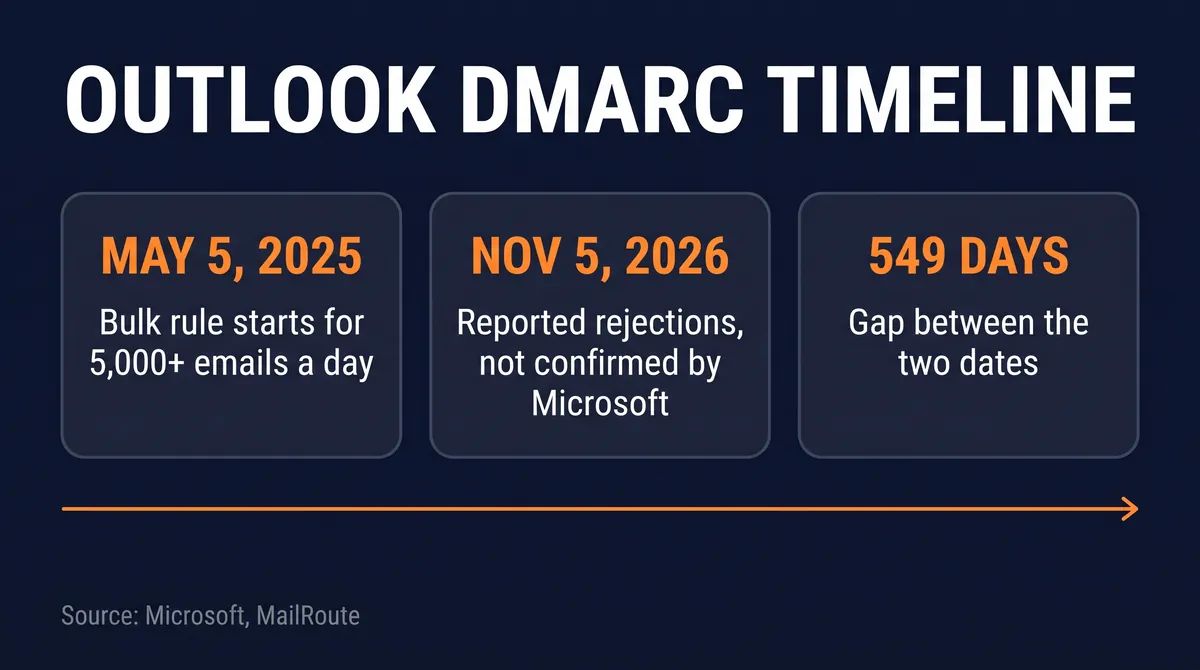
Since November 5, 2026, Outlook.com, Hotmail, Live and MSN have been rejecting some mail from domains with no DMARC record, per MailRoute. Microsoft has not confirmed it; its documented rule covers senders of 5,000+ emails a day.

Abdul Rehman
Lead Systems Architect and Technical Director · · 6 min read
The short version
- 5,000+ emails per day
- Documented bulk-sender threshold
- May 5, 2025
- Bulk rule enforcement began
- November 5, 2026 (per MailRoute)
- Reported rejections began
Why it matters: Microsoft only documents DMARC as mandatory for senders of 5,000+ emails a day, but MailRoute reports Outlook now refuses some mail from any domain without a record, so every domain should publish v=DMARC1; p=none.
On this page
Outlook DMARC requirements officially cover domains that send more than 5,000 emails a day, but since November 5, 2026, Outlook.com, Hotmail, Live and MSN addresses have been rejecting some mail from domains with no DMARC record at all, according to email security firm MailRoute. If your messages started bouncing with an Outlook DMARC error, the first fix is one DNS entry: a TXT record named _dmarc with the value v=DMARC1; p=none.
Microsoft has not confirmed the change. As of November 6, 2026, MailRoute reports, Microsoft had published no postmaster notice, blog post or service-health entry about it. So two things sit side by side: the documented Outlook bulk sender requirements, which Microsoft spelled out in 2025, and a newer, unannounced pattern that rests on one vendor's logs (single secondary report). This explainer separates the two, then covers what DMARC is and how to add it.
Outlook DMARC requirements: what changed on November 5, 2026
The documented part first. On April 2, 2025, Microsoft announced new requirements for high-volume senders on Outlook's consumer service. Any domain sending more than 5,000 emails per day must pass SPF and DKIM, and must publish a DMARC policy of at least p=none that aligns with the sender's domain.
Enforcement began on May 5, 2025. At first, Microsoft said, mail that failed the checks would be routed to Junk rather than refused. The same post, updated on April 30, 2025 (version 4.0), says outright rejection with the code 550 5.7.515 would follow at a date still to be announced.
The reported part is different. MailRoute says that from November 5, 2026, Microsoft's consumer domains started refusing some messages from domains that have no DMARC record, with no mention of volume. The bounce text it logged reads:
550 5.7.1 Message rejected: Message lacks SPF/DKIM/DMARC Auth Records (AS9031519)
On the first day, MailRoute adds, the same message appeared without the (AS9031519) code. Microsoft has not said whether this is a planned rollout, a test or something else.
What is DMARC in email?
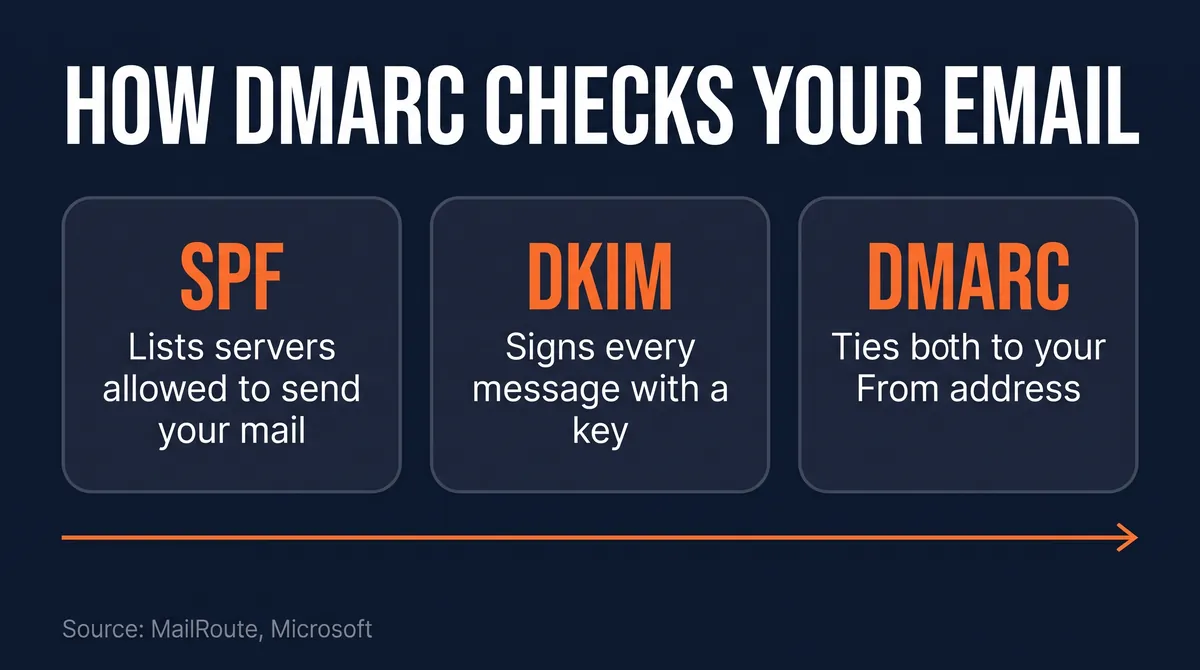
DMARC, short for Domain-based Message Authentication, Reporting and Conformance, is a short DNS record that tells receiving mail servers how to treat a message that claims to come from your domain but fails authentication. It works with SPF and DKIM, two older checks:
- SPF (Sender Policy Framework) is a DNS record listing the servers allowed to send mail for your domain.
- DKIM (DomainKeys Identified Mail) adds a cryptographic signature to each message, which the receiver verifies against a public key in your DNS.
DMARC ties them to the address people actually see. Per MailRoute, a message passes DMARC only when SPF or DKIM passes for the domain in the From address. A message can pass SPF for some other domain, such as a mailing service's, and still be an Outlook DMARC fail for yours. That matching is what "aligned" means in Microsoft's rule.
The policy tag says what you want done with failures. p=none means "watch, but take no action," which is the minimum Microsoft asks bulk senders for. Stricter settings exist; for how Outlook treats them, Microsoft's 2023 post on new DMARC policy handling defaults is the place to start.
Why is Outlook rejecting emails from my domain?
If Outlook is rejecting your emails over authentication, there are two likely cases, and the bounce code hints at which one you are looking at.
If you send more than 5,000 messages a day to Outlook consumer addresses and your SPF, DKIM or DMARC setup is incomplete, you fall under Microsoft's documented rule. Microsoft's announced rejection code for that case is 550 5.7.515 Access denied, sending domain does not meet the required authentication level.
If you are a small sender and the bounce reads 550 5.7.1 ... Message lacks SPF/DKIM/DMARC Auth Records, you match the pattern MailRoute describes: a domain with no DMARC record at all, refused regardless of volume.
Two details make this failure awkward to diagnose:
- It is partial. MailRoute says only some messages from affected domains are refused. One email that arrives does not prove your domain is fine.
- Safe Sender lists will not save you. Microsoft's FAQ for the bulk rule says Safe Sender lists are not honored for this enforcement, so asking recipients to whitelist you does not help with that check.
The two Outlook DMARC error codes differ: 5.7.515 is the one Microsoft documented, while the reported bounces carry 5.7.1. Our reading, not a sourced fact: the November 5 rejections may come from a separate mechanism, not the bulk-sender rollout. Neither source says so, and Microsoft has not commented.
Do I need DMARC for Outlook?
Yes, if you send more than 5,000 emails a day to Outlook consumer addresses: Microsoft's Outlook bulk sender guidelines require it. If you send less, Microsoft's published requirement does not name you, but MailRoute's report suggests domains with no DMARC record can now get some mail refused anyway.
That makes the cost comparison lopsided. A p=none record takes a few minutes to publish and, by design, asks receivers to take no action on failures. Skipping it now risks bounces at outlook.com, hotmail.com, live.com and msn.com addresses, per MailRoute.
There is one common trap for small businesses setting up a DMARC record on Microsoft 365. MailRoute notes that the default DKIM signature Microsoft 365 applies uses your onmicrosoft.com domain, and that signature does not count toward DMARC for your own domain. Until you enable DKIM for your custom domain, your mail can lack DKIM alignment even though it is technically signed.
How do I check if my domain has a DMARC record?
You can check if your domain has a DMARC record with one terminal command. MailRoute suggests:
dig +short TXT _dmarc.example.com
Replace example.com with your domain. If the command prints nothing, you have no DMARC record. If it prints a line starting with v=DMARC1, you have one.
Log in to wherever your DNS is hosted and create:
- Type: TXT
- Name:
_dmarc - Value:
v=DMARC1; p=none
Then work through the rest of the short list:
- Confirm SPF. Make sure every service that sends as your domain (your mailbox provider, newsletter tool, invoicing app) is covered. Microsoft's FAQ warns that an SPF record needing more than 10 DNS lookups may fail the check, so trim includes you no longer use.
- Turn on DKIM for your own domain. On Microsoft 365 that means enabling custom-domain DKIM, not relying on the onmicrosoft.com default.
- Re-test. Send to an Outlook.com or Hotmail address several times, since rejections are partial, and read any bounce codes closely.
What we checked: the gap and the 5,000 threshold
This SyntaxRadar calculation uses only dates and figures from Microsoft's post and MailRoute's report.
The rate is the useful number. Sending 3.5 messages a minute, every minute of every day, is a high bar, and for roughly 18 months Microsoft's written rule left every domain below it out of scope. If MailRoute's logs reflect a real policy, that line has moved for domains with no DMARC record, and it moved without an announcement.
If you run a small team's infrastructure, our guide to the OpenSSH vulnerability 2026 fix is another case of a quiet change you only catch by checking your own systems. Our explainer on what botnets are covers the hijacked-device side of the spam problem that authentication checks are built to fight. And if you are weighing which services can act on your behalf, our piece asking is Plaid safe to use walks through a similar trust question for your bank account.
What to watch next
The open question is whether Microsoft confirms the November 5 behaviour and, if so, whether it attaches a code and a volume rule to it. Watch the Microsoft Tech Community post for a dated announcement of the 550 5.7.515 rejection phase, and watch your own bounce logs for either code.
Until then, treat the Outlook DMARC requirements as covering everyone. One TXT record, plus SPF and DKIM set up for your own domain, puts you on the right side of both the documented rule and the reported one.
Questions readers ask
What is DMARC in email?
DMARC is a DNS record that tells receiving mail servers what to do when a message claiming to come from your domain fails authentication. It builds on SPF and DKIM, and a message passes only when SPF or DKIM passes for the domain in the visible From address. The minimal version, p=none, asks receivers to watch but take no action.
Why is Outlook rejecting emails from my domain?
Either you send more than 5,000 emails a day and fail Microsoft's documented SPF, DKIM and DMARC checks, or your domain has no DMARC record at all. MailRoute reports that since November 5, 2026, Outlook consumer domains refuse some messages from domains without one, with the bounce 550 5.7.1 Message lacks SPF/DKIM/DMARC Auth Records. Microsoft has not confirmed that change.
Do I need DMARC for Outlook?
Microsoft requires it for domains sending more than 5,000 emails a day to Outlook consumer addresses, at a policy of at least p=none and aligned with your domain. For smaller senders the written rule does not apply, but MailRoute's report of rejections for domains with no record makes publishing one a sensible step for everyone.
How do I check if my domain has a DMARC record?
Run dig +short TXT _dmarc.yourdomain.com in a terminal, replacing yourdomain.com with your own domain. No output means no DMARC record. To add one, create a TXT record named _dmarc with the value v=DMARC1; p=none at your DNS host, then make sure SPF and custom-domain DKIM are also set up.
How do I fix an Outlook DMARC error?
Publish a DMARC record, a TXT record named _dmarc with the value v=DMARC1; p=none, at your DNS host. Then confirm SPF covers every service that sends as your domain, enable DKIM for your custom domain on Microsoft 365, and re-test several times, since MailRoute says the rejections are partial.
Sources
Written by
Abdul Rehman
Lead Systems Architect and Technical Director at Syntaxradar. More in Systems.
Keep reading

Apple Knowledge Graph: What Your Mac Learns About Your Family
An 8rank.ai write-up dated October 28, 2026 found macOS builds an on-device knowledge graph in 51 plaintext SQLite databases, with two classifiers scoring which contacts are…
Nov 9, 2026 · 8 min read

Supermarket Fridges Hacked: How Freezers Were Set to 50C
On October 11 to 12, 2026, attackers reached internet-exposed refrigeration controllers in about 700 French supermarkets and, per reports, apparently forced a 50C defrost. In…
Nov 8, 2026 · 8 min read

Why Is Discord Using So Much RAM? The Rust App Shown at 290MB
On November 5, 2026 Discord CTO Stanislav Vishnevskiy said on X, as quoted by The Verge, that the desktop app is dropping Electron for Rust. A Discord-supplied, unverified…
Nov 7, 2026 · 8 min read
More in Systems
See all
OpenSSH Vulnerability 2026: The Alpine Login Bug and the Fix
OpenSSH 10.6p2 shipped on November 5, 2026 to work around a password bypass on musl Linux systems without PAM. Alpine says an attacker who can reach the SSH port can log in…
Nov 6, 2026 · 8 min read

LTO Tape: Why Fujifilm Wants 5x More Capacity for AI Archives
On October 29, 2026, Fujifilm said it will invest about 10 billion yen at its Odawara Site to raise data storage tape production capacity about five times versus fiscal 2025 by…
Nov 5, 2026 · 6 min read

What Are Botnets? How 1.3 Million Android TV Boxes Became One
Google and partners dismantled XCPE, a botnet that Google says TV box maker Videostrong preloaded on more than 1.3 million set-top boxes to sell proxy access and run ad fraud.…
Nov 4, 2026 · 8 min read
Latest stories
Front page
Megaspeed: The Nvidia Buyer in the Reported DOJ Chip Probe
Abdul Rehman · Nov 10, 2026 · 8 min read

Starship Flight 15: The Nov 13 Target and First Ship Catch
Abdul Rehman · Nov 10, 2026 · 6 min read

Claude Fable 5.2: $8 Price, Fast Mode and Whether to Switch
Abdul Rehman · Nov 10, 2026 · 7 min read

Googlebook OS Update: November Patch Frees Up to 6GB of RAM
Abdul Rehman · Nov 9, 2026 · 6 min read