


Claude Code Extension VSCode Backdoor: How to Check and Clean Up
Phorion reports that Claude Code for VS Code 2.1.313 on the Cursor Marketplace hid a backdoor that planted an SSH key, opened a reverse tunnel and beaconed system details. Cursor pulled the release, but uninstalling does not remove the backdoor.

Abdul Rehman
Lead Systems Architect and Technical Director · · 7 min read
The short version
- 2.1.313
- Affected version
- Every 60 seconds
- Reconnect interval
- Up to 40
- Secret env var names sent
Why it matters: If Claude Code for VS Code 2.1.313 ever ran on your machine, removing it is not enough: check for the svc-telemetry SSH key and persistence files, clean them up and rotate exposed credentials.
Anyone with a Claude Code extension VSCode install, or its Cursor build, should check one thing first: the version number. According to an advisory from security firm Phorion, release 2.1.313 of Claude Code for VS Code, served through the Cursor Marketplace, carried a hidden backdoor that ran the moment the extension loaded. Nothing asked for permission.
Cursor has pulled the release. That helps people who never installed it, and does nothing for those who did. Phorion's analysis says the code planted an SSH key, opened a reverse tunnel to a remote server and set itself up to come back after every reboot. Removing the extension does not undo any of that.
This guide explains what the Claude Code extension backdoor did in plain English, how to tell if your machine is affected, how to clean it up, and how to vet AI coding extensions before the next one lands. One caveat up front: Phorion is the only primary source so far, so every technical detail below is Phorion's finding.
What happened to the Claude Code extension for VS Code?
The Claude Code extension for VS Code is the add-on that puts Anthropic's coding assistant inside your editor. On October 30, 2026, Phorion researcher Calum Hall published an advisory saying version 2.1.313 of that extension, as distributed on the Cursor Marketplace, had been tampered with.
According to Phorion, Cursor removed the release, and the NPM and VS Code versions of 2.1.313 were also pulled. The advisory does not change what you need to do: if 2.1.313 ever ran on your machine, treat that machine as compromised until you have checked it.
The story spread fast among developers. The Hacker News thread about the backdoor reached 531 points. At the time of writing, a web search found no second independent report confirming the details, so keep that in mind as you read.
How the Claude Code extension VSCode backdoor worked, in plain English
Every VS Code extension has a main file, usually called extension.js. Normally the editor loads that file and then calls a function named activate when the extension is needed. Phorion found that someone had inserted an extra block of code at the very top of the file, written as an IIFE (an immediately invoked function expression, code that runs the instant it is read).
That placement is the clever and nasty part. Because the code sat above everything else, it ran as soon as Node loaded the file, before activate and without any action from you. Opening your editor was enough.
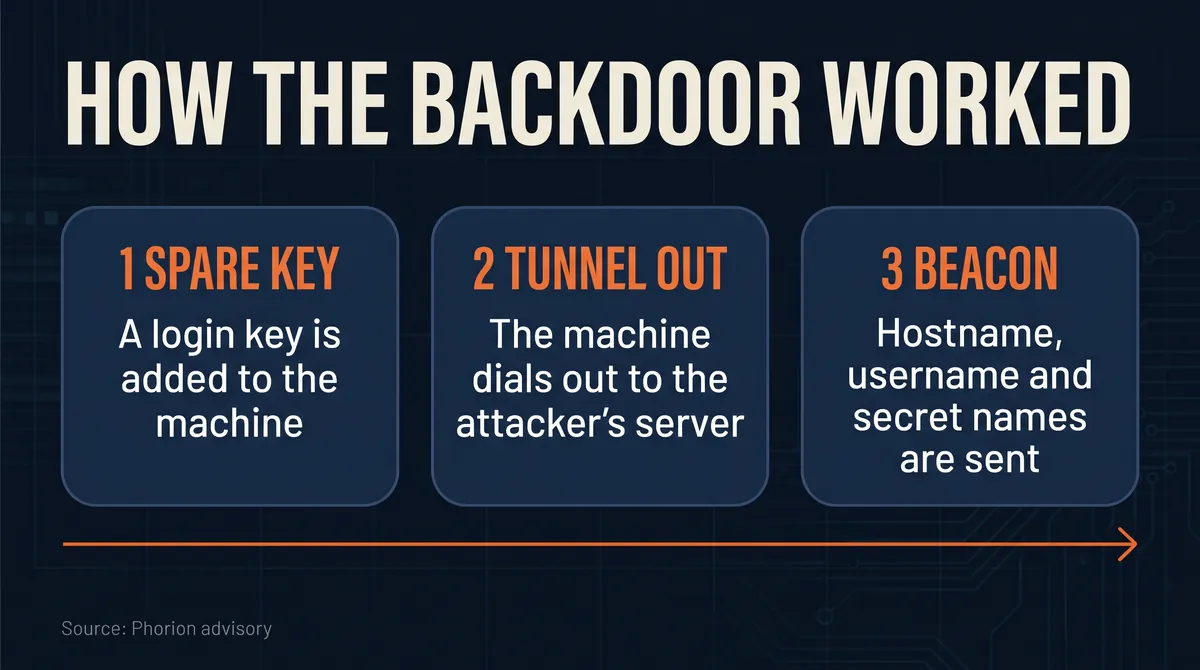
From there, Phorion describes three moves.
Stage 1: a spare key to your machine
The code appended an Ed25519 SSH key to ~/.ssh/authorized_keys, labelled with the comment svc-telemetry. That file is the list of keys allowed to log in to your account over SSH. The label is chosen to look like boring housekeeping.
Stage 2: a tunnel that dials out
Most home and office networks block strangers from connecting in. So the code connected out instead. Phorion says it opened an SSH connection to 134.209.82[.]225 on port 22 as a user named tunnel, with a reverse tunnel option (-R *:0:localhost:22). In effect, your machine handed the attacker's server a door back to your own SSH service. The key it used was stored at $TMPDIR/.stk_ followed by 10 hex characters.
Stage 3: a beacon with your details
The code also sent one HTTP POST to /beacon on the same address, port 8099. Per Phorion, it included your hostname, username, platform, CPU architecture, Git email, public IP and the names of up to 40 environment variables matching KEY, TOKEN, SECRET, PASS, AWS or GCP. That is a shopping list: it tells the attacker which machines hold cloud credentials worth going after.
Why uninstalling the extension is not enough
The backdoor was built to outlive the extension. According to Phorion, it installed persistence on every major desktop system:
- macOS: a LaunchAgent at
~/Library/LaunchAgents/com.apple.sysmond.plist, plus files at~/.config/.smtand.smtk. The name imitates a real Apple service. - Linux: an
@rebootcron entry. - Windows: a scheduled task called
SysMon, or asysmon.cmdfile in the Startup folder.
Once set up, it tried to reconnect every 60 seconds and used autossh if that tool was installed. The extension was only the delivery truck. Delete it and the cargo stays behind.
There is one twist on Macs. Phorion found a logic bug: without admin rights, the command systemsetup -getremotelogin errors but still reports success, so the step that would switch on Remote Login was skipped. If Remote Login was already off, the inbound route may not have worked. The outbound beacon is a separate matter, and so is anything the attacker learned from it, so do not treat the bug as a free pass.
How to check for malicious VSCode extensions on your machine
Here is how to check for malicious VSCode extensions, using the indicators Phorion published. Run these on any machine that had version 2.1.313 of Claude Code for VS Code installed in Cursor or VS Code. In order, they look for the planted key, the macOS LaunchAgent and helper files, a Linux @reboot cron entry, the stored tunnel key and any live SSH or autossh processes you did not start.
grep svc-telemetry ~/.ssh/authorized_keys
ls -la ~/Library/LaunchAgents/com.apple.sysmond.plist ~/.config/.smt* 2>/dev/null
crontab -l | grep @reboot
ls -la "$TMPDIR"/.stk_* /tmp/.stk_* 2>/dev/null
ps aux | grep -E "autossh|ssh .*tunnel@" | grep -v grep
On Windows, open Task Scheduler and look for a task named SysMon, then check your Startup folder for sysmon.cmd.
Two more checks help if you want certainty. Phorion lists the SHA-256 hash of the backdoored extension.js as ecb58cb29078d9646ad1dcdbe51526f2d9cfea06be5fb2ab183e8ecc3ab6bf15, and the fingerprint of the planted key as SHA256:0Z6R+DF64Do2nwQic8a7kkfDLNNk4IiK+2U2Rci4htk. If either matches, you were hit. Your SSH logs are the other clue: Phorion says a login from 127.0.0.1 or ::1 using the svc-telemetry key is the sign that someone came back through the tunnel.
How to clean it up
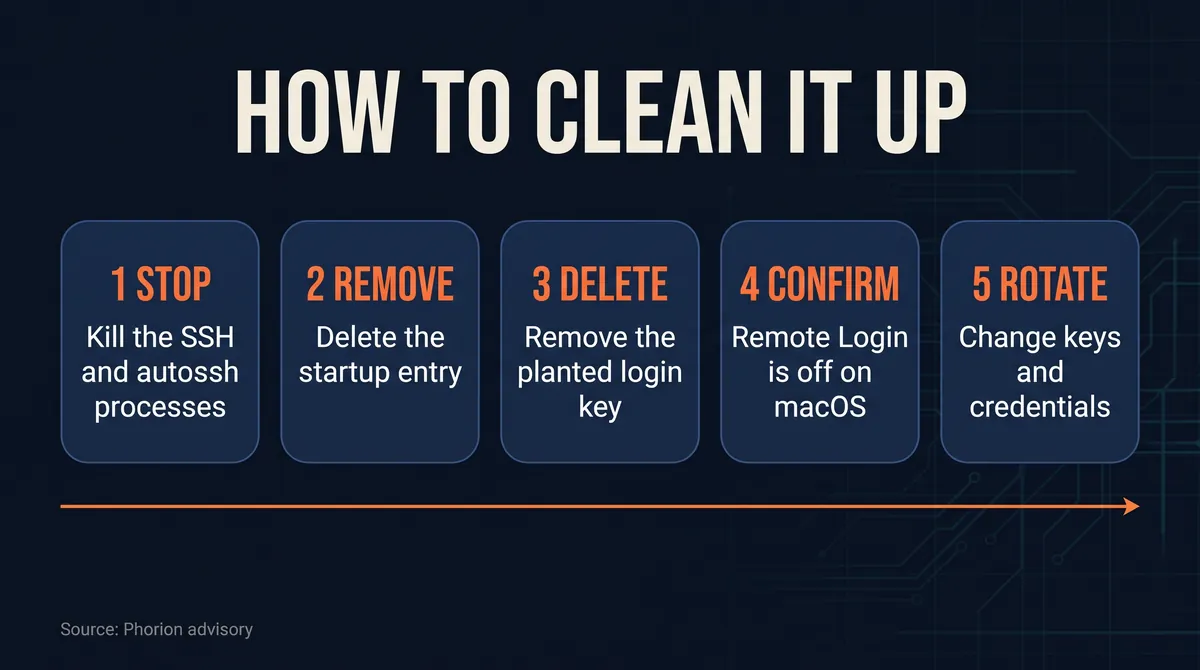
Phorion's cleanup steps, in order:
- Stop the retry loop and kill any SSH or
autosshprocesses it started. - Remove the LaunchAgent,
~/.config/.smtand.smtk(or the cron entry, scheduled task orsysmon.cmdon Linux and Windows). - Delete the
svc-telemetryline from~/.ssh/authorized_keysand remove/tmp/.stk_*. - Confirm Remote Login is off on macOS.
- Rotate your credentials if SSH was enabled or you suspect an inbound login.
One addition to step 5: if the beacon could have listed token or cloud key names from your environment, rotate those keys anyway. Rotation is cheap compared with finding out later.
Is the Claude Code extension safe?
Is the Claude Code extension safe now? Based on Phorion's advisory, the problem was a single release, 2.1.313, and that release has been pulled from the Cursor Marketplace, NPM and VS Code. The advisory names only 2.1.313 as affected.
That is a narrower statement than "safe". No account of how the tampered build reached the marketplace has been published in the sources we reviewed, and there is only one primary source. Until more is known, the sensible position is: confirm you are not on 2.1.313, run the checks above if you ever were, and watch for follow-up reports.
The wider lesson is that AI coding tools hold an unusual amount of trust. They read your code, run commands and sit next to your SSH keys and cloud tokens. As we covered in our piece on computer-use AI agents, the more an assistant can do on your machine, the more a poisoned copy can do too.
Is there a Claude Code extension for Cursor?
Yes. Cursor is built on VS Code, so it runs VS Code extensions, and the Claude Code extension in Cursor is installed from the Cursor Marketplace. That is exactly the channel where Phorion found the backdoored 2.1.313 release.
This is why the incident matters beyond one bad version. Phorion found the backdoor in a release served through the Cursor Marketplace itself, so the attack did not depend on a fake name.
How to vet AI coding extensions from now on
None of these steps would have made you immune, but each one shrinks the window:
- Pin and read versions. Turn off automatic extension updates for tools that can run commands, and look at the changelog before you accept a new release.
- Wait a day on big tools. A short delay before updating lets early reports, like this one, surface first.
- Watch your `authorized_keys` file. Few developers ever look at it. A new line you did not add is an alarm.
- Keep secrets out of your shell. The beacon only saw variable names, but those names told an attacker where to look. A secrets manager beats a long list of tokens in your environment.
- Treat an editor like a server. If you would not run an unknown binary on a production box, be careful about what runs inside the editor that holds your keys.
For a sense of how fast attackers are moving with AI tooling, see our report on AI for hacking and CrowdStrike's ARTEX findings.
What to watch next
Three things will tell us how big this really is. First, whether Anthropic or Cursor publish their own account of how a backdoored build of the Claude Code extension for VSCode reached the marketplace. Second, whether other security researchers confirm Phorion's indicators, since Phorion's advisory is still the only primary source. Third, whether marketplaces add stronger signing or review for extensions that can run code the moment they load.
Until then, the to-do list for VS Code and Cursor users is short: check your version, run the checks, clean up if needed and rotate anything that might have leaked.
In code
grep svc-telemetry ~/.ssh/authorized_keys
ls -la ~/Library/LaunchAgents/com.apple.sysmond.plist ~/.config/.smt* 2>/dev/null
crontab -l | grep @reboot
ls -la "$TMPDIR"/.stk_* /tmp/.stk_* 2>/dev/null
ps aux | grep -E "autossh|ssh .*tunnel@" | grep -v grepQuestions readers ask
Is the Claude Code extension safe?
According to Phorion, the backdoor was in one release, Claude Code for VS Code 2.1.313 on the Cursor Marketplace, and that release has been pulled. The advisory does not report other affected versions. Confirm you are not on 2.1.313, and if you ever were, check your machine for the planted SSH key and persistence files, because uninstalling alone does not remove them.
How to check for malicious VSCode extensions like this one?
For this backdoor, Phorion's indicators are the clearest test. Search ~/.ssh/authorized_keys for a key labelled svc-telemetry, look for the com.apple.sysmond LaunchAgent on macOS, an @reboot cron entry on Linux or a SysMon task on Windows, and check SSH logs for logins from 127.0.0.1 or ::1 using that key.
Is there a Claude Code extension for Cursor?
Yes. Cursor is built on VS Code and installs the Claude Code extension from the Cursor Marketplace. That marketplace is where Phorion found the backdoored 2.1.313 release, which Cursor has since removed. If you use Claude Code in Cursor, check which version you have installed and run the cleanup checks if it was ever 2.1.313.
Does uninstalling the backdoored extension remove the malware?
No. Phorion says the code installed persistence that survives removal: a LaunchAgent and hidden config files on macOS, a reboot cron job on Linux and a scheduled task or Startup script on Windows. It retries its tunnel every 60 seconds. You need to kill those processes, delete the files and the svc-telemetry key, and rotate credentials if needed.
Written by
Abdul Rehman
Lead Systems Architect and Technical Director at Syntaxradar. More in Developer Tools.
More in Developer Tools
See all
AO3 Outage: Why Is AO3 Down, and Is Your Account Safe?
AO3 went offline on Oct 29, 2026 under a maintenance notice, and OTW estimated 2 to 4 weeks to restore it. On Oct 30 OTW said it had detected evidence of a security incident, that…
Oct 30, 2026 · 7 min read

Tmux Ghostty Guide: What 1.4 Changes and Who Should Switch
Ghostty 1.4.0 shipped on October 27, 2026 after seven months of work by 172 contributors. It parses plain text up to 5.7x faster, cuts idle scrollback memory by 70% to 90%, adds…
Oct 28, 2026 · 7 min read

KV Cache Explained: How a Cloudflare Bug Leaked Users' Prompts
Cloudflare disclosed that 155 responses from its GLM-5.3 model on Workers AI contained fragments of other customers' prompts. A 681,280-token KV cache pool behind a…
Oct 27, 2026 · 7 min read
Latest stories
Front page
Xreal Aura: Should You Buy the $1,099 Android XR Glasses?
Abdul Rehman · Oct 31, 2026 · 7 min read

AI for Hacking: CrowdStrike Says ARTEX Targeted 200+ Orgs
Abdul Rehman · Oct 30, 2026 · 7 min read

Binance Hacked: How One Laptop May Have Led to a $6.36B Theft
Abdul Rehman · Oct 30, 2026 · 8 min read

What Is AI Capex? Why Alphabet's $51.4B Bill Spooked Wall Street
Abdul Rehman · Oct 30, 2026 · 7 min read