


KV Cache Explained: How a Cloudflare Bug Leaked Users' Prompts
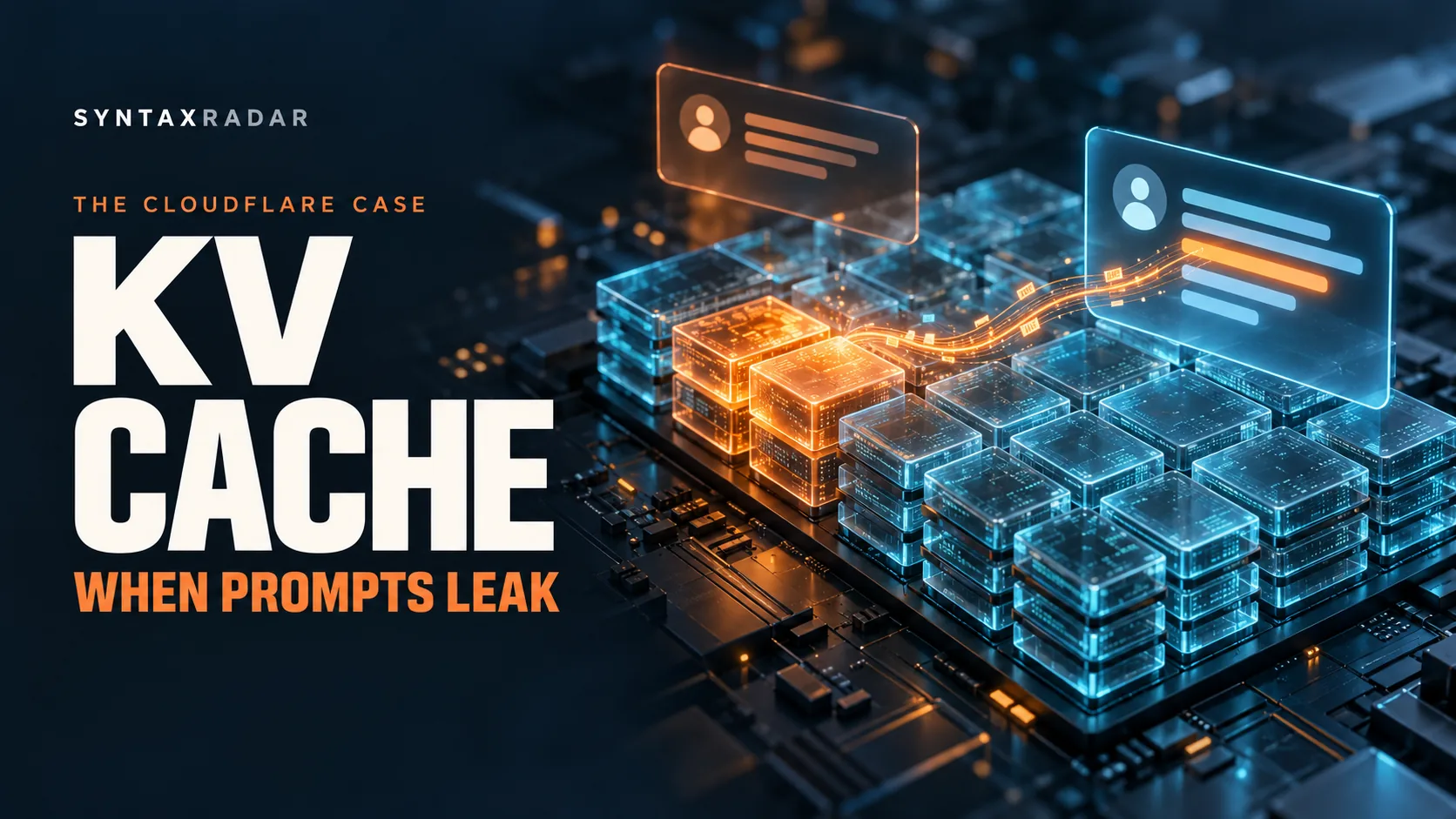
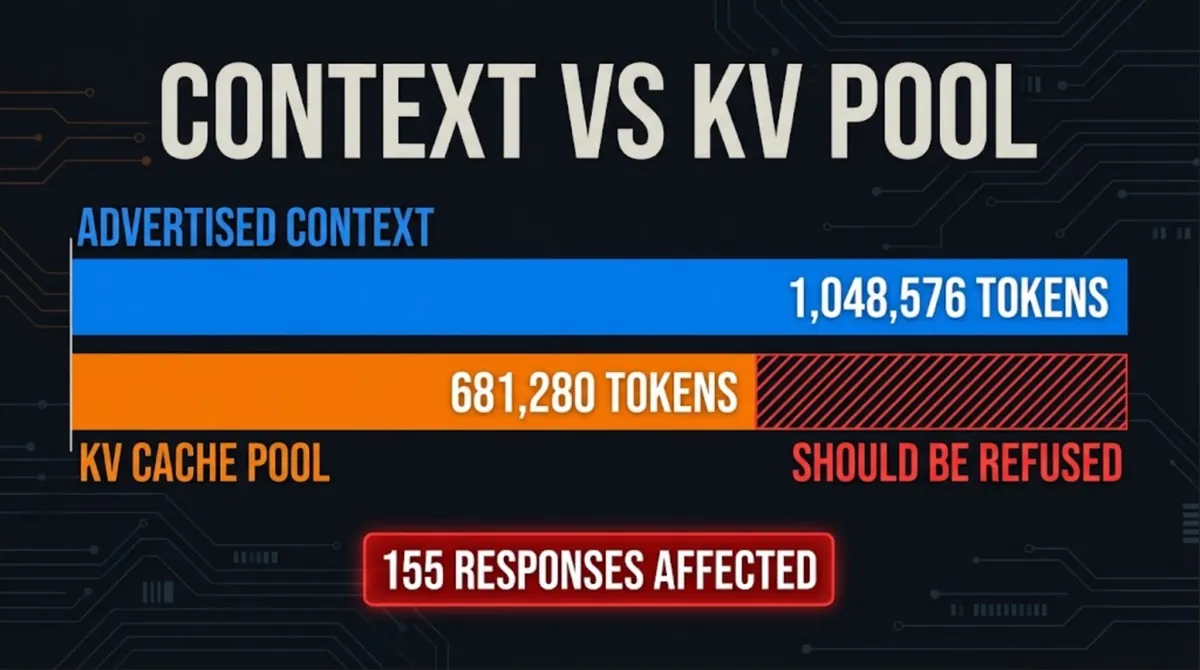
Cloudflare disclosed that 155 responses from its GLM-5.3 model on Workers AI contained fragments of other customers' prompts. A 681,280-token KV cache pool behind a 1,048,576-token context, plus an SGLang bug, let the model read stale memory.

Abdul Rehman
Lead Systems Architect and Technical Director · · 7 min read
The short version
- 155
- Affected responses
- 681,280 tokens
- Prefill KV pool before fix
- 1,048,576 tokens
- Advertised context window
Why it matters: A KV cache pool smaller than the advertised context, plus an SGLang admission bug, let GLM-5.3 read other users' leftover memory, so anyone running inference should check pool size against context length after every config change.
For nearly two weeks this summer, a small number of people using Cloudflare's GLM-5.3 model got back answers stitched partly from someone else's prompt. Not a hack, not a stolen password: a memory bookkeeping mistake inside the part of an AI model called the KV cache. Explained simply, that cache is the model's short-term notepad, and for 155 responses it was reading pages a previous customer had left behind.
Cloudflare published a coordinated disclosure of the GLM-5.3 KV cache exposure on October 26, and it is one of the clearest real-world lessons in how large language models actually run. The leak window ran from August 27 to September 9, 2026, and only hit prompts longer than 681,280 tokens.
By the end of this piece you will know what a KV cache is, why it eats so much GPU memory, how two numbers that did not match turned it into a privacy problem, and what to do about it whether you send prompts to a shared API or run your own servers.
What happened to GLM-5.3 on Workers AI?
GLM-5.3 is a large model Cloudflare hosts on Workers AI, its pay-per-use AI platform, under the name @cf/zai-org/glm-5.3. According to the launch changelog, it shipped with a context window of 1M tokens, priced at $1.40 per million input tokens, $0.26 per million cached input tokens and $4.40 per million output tokens.
That 1M figure was the problem. The advertised context was 1,048,576 tokens, but the memory pool that held the prefill KV cache could only fit 681,280 tokens. Any prompt bigger than the pool should have been refused. Instead, a bug in SGLang, the open-source serving engine underneath, let some of those requests through in a broken state.
The result, per Cloudflare's write-up: 155 responses contained fragments of other customers' prompts and partial generations. Gadi Evron of the security firm Knostic reported it through HackerOne on September 8 at 23:11 UTC. Cloudflare reproduced it with two test accounts within 25 minutes of declaring an incident the next day.
What is KV cache in LLM?
Start with how a chatbot writes. A large language model produces text one token (roughly a word fragment) at a time. To pick each new token, it runs a step called attention, which looks back over every earlier token in the conversation and decides which ones matter right now.
For each earlier token, attention needs two small sets of numbers: a key (what this token is about) and a value (what it contributes). Recomputing those for the whole conversation on every new word would be absurdly wasteful. So the model stores them. That store is the KV cache, short for key-value cache.
That is the KV cache meaning in one line: saved work, so the model does not redo attention math over tokens it has already seen. As the Towards AI explainer puts it, the cache grows with context length times the number of people being served at once, and it can end up bigger than the model's own weights.
That growth is why long context is expensive. A million-token window is a promise that the server has room to keep a million tokens' worth of keys and values in GPU memory for you, alongside everyone else being served by the same machines.
How does KV cache work?
Serving engines like SGLang do not hand each request one giant block of memory. They carve GPU memory into a shared pool of fixed-size pages and lend pages out as needed. When your request finishes, its pages go back to the pool and get reused by the next request. Nobody wipes them first, because overwriting them is the next request's job.
Cloudflare's setup was also disaggregated, meaning the work is split across two kinds of machine:
- Prefill nodes read your whole prompt at once and build its KV cache.
- Decode nodes take that cache and generate the reply token by token, reading the cache at every step.
Between the two sits an admission step that decides whether a request is valid and ready to hand over. This design is common because the two jobs stress hardware differently. It also means the KV cache travels between machines, and both sides have to agree on exactly which pages hold real data.
If you want the performance side of this story, our explainer on RadixAttention and prefix caching in SGLang covers how the same engine reuses cached prefixes to cut latency for multi-turn agents.
KV cache explained through the bug: seven stale pages
Here is the chain of events from Cloudflare's root-cause analysis, in plain terms.
- A prompt arrives that is longer than 681,280 tokens, so it cannot fit in the prefill pool.
- SGLang marks it as rejected and swaps in a one-token placeholder instead of failing loudly.
- The disaggregated admission check only asks one question: is this request finished? A rejected request counts as finished, so it passes through as if it were normal.
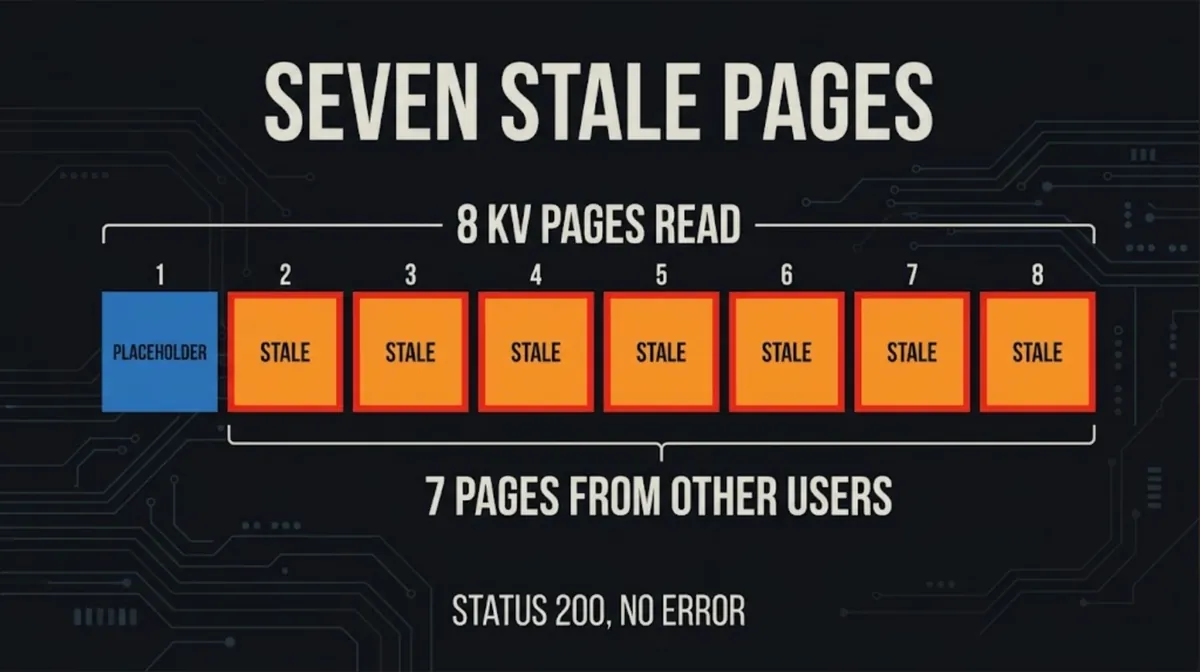
- The decode node reserves 8 KV pages, expecting a full handoff. Prefill wrote only one page, the placeholder.
- The decode node then runs attention over all 8 pages. Seven of them still hold keys and values from earlier requests to the same model, belonging to other users.
The model did what models do: it wrote fluent text based on what was in its notepad. Some of that notepad was other people's prompts. The output came back coherent, with an HTTP 200 success code rather than a 400 error, so nothing looked wrong on either side.
That is also why it slipped past testing. Cloudflare says its pre-launch tests checked status codes, not what the model actually said. A test that expected a rejection would have seen a cheerful 200 and moved on.
Can an AI model leak other users' data?
Yes, and this case shows the route is often plumbing rather than the model itself. The weights of GLM-5.3 did not memorize anyone's secrets. The leak happened because shared memory was reused without a hard guarantee that a request could only read its own pages.
Every shared AI API serves many customers on the same GPUs, because that is what makes per-token pricing cheap. Isolation between those customers is enforced by software: page tables, admission checks, size limits. When one of those checks has a gap, data from one request can bleed into another.
It is worth keeping the scale in proportion. Cloudflare counts 155 affected responses, all from very long prompts, on one model, and says it saw no evidence of deliberate exploitation. The bug was not unique to Cloudflare either: the same SGLang flaw had been reported upstream as issue #30233 on July 6, 2026, and a fix (PR #36988) was merged on September 6, three days before Cloudflare's incident, in SGLang v0.5.20.
Is Cloudflare Workers AI safe?
On the evidence published, Cloudflare handled the response quickly once it knew. The timeline on September 9, all UTC:
After the fix, the prefill pool holds about 2.04 million tokens, roughly twice the context length, so a maximum-size prompt now fits. Cloudflare says no other Workers AI model was affected, met the SGLang maintainers at RadixArk on September 10, and coordinated the public write-up for October 26.
So it is reasonably safe in the sense that the hole is closed and was disclosed openly. The honest caveat is that it ran for nearly two weeks before an outside researcher reported it.
If you send prompts to a shared AI API
Treat any multi-tenant API as a place where a bug could, rarely, expose what you send. Keep secrets, credentials and regulated personal data out of prompts unless you have a contract and a risk review that cover it. Very long prompts deserve extra thought, since this bug only fired above a size threshold.
If you run your own inference
Cloudflare's advice is specific. After any change to model weights, quantization, parallelism or memory settings, compare the KV pool size with the advertised context length on every prefill and decode node. Upgrade SGLang to v0.5.22 or later; v0.5.21 added a follow-up fix (PR #38935). And, given how this bug hid, test what the model returns, not only the status code: send an over-length prompt and confirm it is refused.
Most KV cache optimization work, from KV cache quantization to compression to offloading pages into CPU memory, exists to squeeze more tokens into a fixed pool. This incident is the reminder that the pool size is also a security boundary, and each of those tricks changes how many tokens fit in it.
What to watch next
Watch for other providers running SGLang with disaggregated prefill and decode to say whether they checked their own pool sizes. Watch SGLang itself: v0.5.21 on October 2 and v0.5.22 on October 19 both followed the original fix, a sign the maintainers are still hardening this path. And watch whether hosted AI platforms start publishing isolation tests the way cloud providers publish security audits.
The bigger takeaway is simple. A KV cache is just memory, and memory that gets shared needs the same care as any other shared resource.
Questions readers ask
What is a KV cache in simple terms?
It is the model's short-term notepad. For every token already in the conversation, the model stores a key and a value so it does not recompute attention over earlier text each time it writes a new token. The cache grows with context length and the number of users served at once, and it can exceed the size of the model's weights.
How did the Cloudflare GLM-5.3 leak happen?
Prompts longer than the 681,280-token prefill pool were marked rejected by SGLang and replaced with a one-token placeholder, but the admission check only asked whether a request was finished, so they passed through. Decode reserved 8 KV pages while prefill wrote one, so the model read seven stale pages holding other users' data.
Was my data exposed on Workers AI?
Only if you used GLM-5.3 between August 27 and September 9, 2026, with very long prompts. Cloudflare says 155 responses were affected, all to prompts longer than 681,280 tokens, that no other Workers AI model was affected, and that it saw no evidence of deliberate exploitation. The model was fixed and restored on September 9.
What should teams running SGLang do now?
Upgrade to SGLang v0.5.22 or later. After any change to weights, quantization, parallelism or memory settings, compare the KV pool size with the context length on every prefill and decode node. Also check what the model actually returns for an over-length prompt, because this bug produced an HTTP 200 with coherent text instead of an error.
Written by
Abdul Rehman
Lead Systems Architect and Technical Director at Syntaxradar. More in Developer Tools.
More in Developer Tools
See all
Claude Code Extension VSCode Backdoor: How to Check and Clean Up
Phorion reports that Claude Code for VS Code 2.1.313 on the Cursor Marketplace hid a backdoor that planted an SSH key, opened a reverse tunnel and beaconed system details. Cursor…
Oct 31, 2026 · 7 min read

AO3 Outage: Why Is AO3 Down, and Is Your Account Safe?
AO3 went offline on Oct 29, 2026 under a maintenance notice, and OTW estimated 2 to 4 weeks to restore it. On Oct 30 OTW said it had detected evidence of a security incident, that…
Oct 30, 2026 · 7 min read

Tmux Ghostty Guide: What 1.4 Changes and Who Should Switch
Ghostty 1.4.0 shipped on October 27, 2026 after seven months of work by 172 contributors. It parses plain text up to 5.7x faster, cuts idle scrollback memory by 70% to 90%, adds…
Oct 28, 2026 · 7 min read
Latest stories
Front page
Xreal Aura: Should You Buy the $1,099 Android XR Glasses?
Abdul Rehman · Oct 31, 2026 · 7 min read

AI for Hacking: CrowdStrike Says ARTEX Targeted 200+ Orgs
Abdul Rehman · Oct 30, 2026 · 7 min read

Binance Hacked: How One Laptop May Have Led to a $6.36B Theft
Abdul Rehman · Oct 30, 2026 · 8 min read
What Is AI Capex? Why Alphabet's $51.4B Bill Spooked Wall Street
Abdul Rehman · Oct 30, 2026 · 7 min read