


MacBook Touch Screen: Which New MacBook Pro Finally Has One
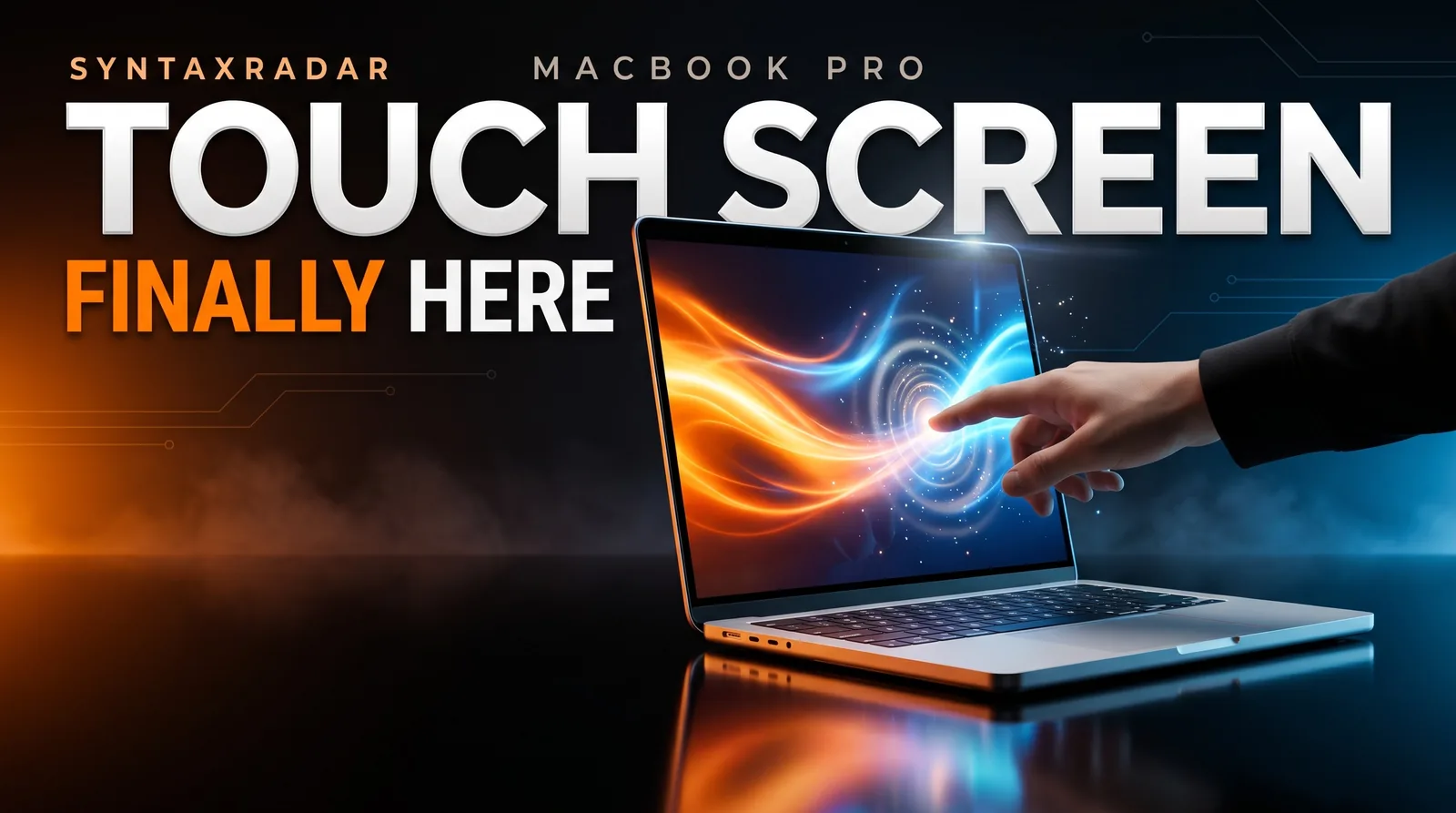
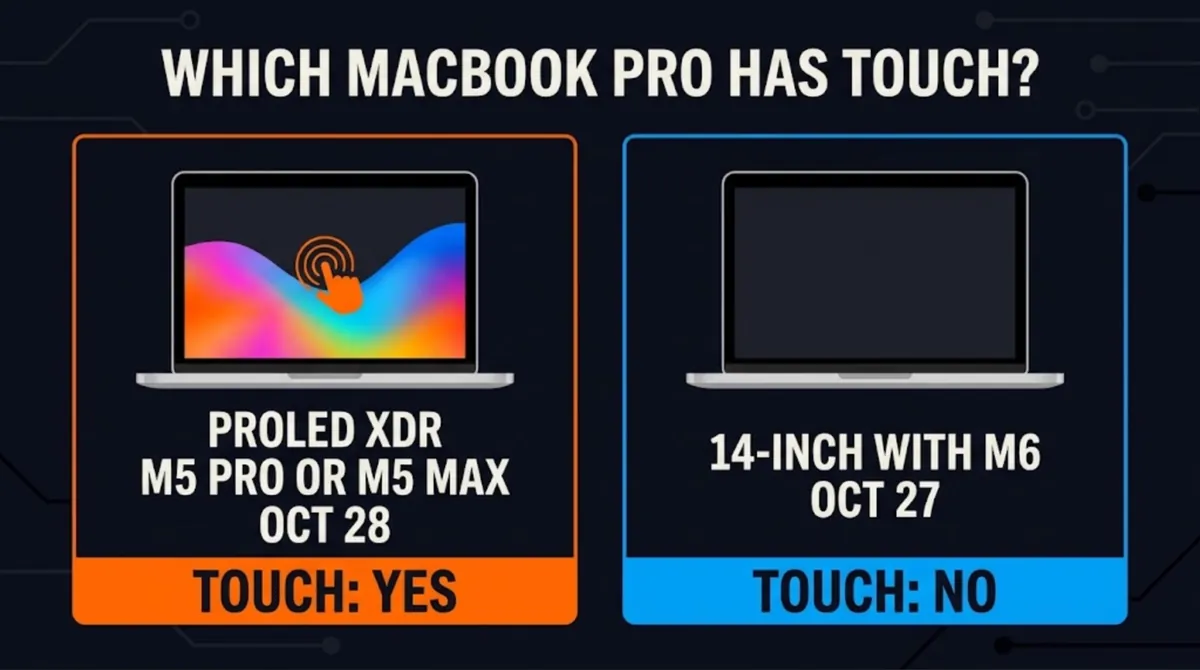
On October 28, 2026, Apple announced the MacBook Pro with PROLED XDR Display, 14- and 16-inch models with M5 Pro or M5 Max and the first touch screen on a MacBook Pro. It ships November 6. The M6 14-inch MacBook Pro announced a day earlier has no touch screen.

Abdul Rehman
Lead Systems Architect and Technical Director · · 8 min read
The short version
- $2,899
- Starting price (14-inch, M5 Pro)
- 2000 nits
- Peak brightness (Apple's claim)
- November 6, 2026
- Availability
Why it matters: Only the new M5 Pro and M5 Max MacBook Pro with the PROLED XDR OLED display has touch, it lists $400 above the previous models at each chip tier, and every performance claim is Apple's until reviews arrive after November 6.
Yes, there is finally a MacBook touch screen. On October 28, 2026, Apple announced the MacBook Pro with PROLED XDR Display, a 14-inch and 16-inch laptop that Apple says is the first MacBook Pro with Touch. Pre-orders opened the same day, and the machines arrive on Friday, November 6.
One day earlier, Apple announced a different laptop, the 14-inch MacBook Pro with M6, and that one does not have a touch screen. Both are called MacBook Pro and both ship November 6, so it is easy to buy the wrong one and find you cannot tap the screen.
Nobody has independently tested these laptops yet. Every battery and display number below is Apple's claim until reviews land.
Does MacBook have touch screen?
Only one family does, and it is the new high-end one. The touch screen MacBook Pro comes in 14-inch and 16-inch sizes, uses Apple's new PROLED XDR display, and runs M5 Pro or M5 Max chips. Not M6. That surprises people, because the M6 is the newer chip.
The M6 model is the cheaper 14-inch MacBook Pro. MacRumors describes it as the low-end 14-inch option, sitting under the touch models, while Apple keeps selling the existing mini-LED MacBook Pro models alongside both. The two models side by side:
Sources: Apple's touch MacBook Pro announcement, Apple's M6 announcement, MacRumors pricing.
If you want to know whether the M6 chip itself is worth the upgrade over M5, we covered that in MacBook Pro M6 vs M5: who should upgrade. This article sticks to the touch model.
What the MacBook touch screen actually does
Think of touch as a third way to control the Mac, next to the keyboard and trackpad, not a replacement for them. Apple says touch works alongside keyboard shortcuts and trackpad gestures, so in principle you can tap when it is handy and use the keyboard and trackpad the rest of the time.
The gestures Apple lists are the ones you already know from a phone. Swipe to scroll a webpage. Pinch to zoom in on a photo. Drag slides from one presentation into another. Double-tap a window to fill the screen, or flick it to tile it into place.
On its product page, Apple adds drawing and annotating onscreen, rotating 3D objects and playing virtual instruments.
According to Apple, many existing apps work with touch right away because macOS automatically translates touches into clicks. A tap is a click. For many apps, that means basic tapping works without an update. Developers who want more than that can use updated system gesture APIs to build controls designed for fingers.
Apple names a long list of third-party apps that will take advantage of touch: Notion, Canva, Zoom, Microsoft Word, Excel, PowerPoint and Outlook, Adobe Lightroom, DaVinci Resolve, Blender, Maxon Cinema 4D, Maxon ZBrush, Shapr3D and Algoriddim djay Pro. That list leans heavily toward creative and 3D work, which tells you who Apple has in mind.
Three smaller details matter in daily use:
- A sturdier hinge. Apple says a newly designed hinge provides greater stability while you use touch.
- Steadier video calls. Video stabilization smooths the camera feed in real time when you use touch on a video call.
- A test bench for app makers. Developers can test how touch performs in their iOS and iPadOS apps directly on the MacBook Pro display.
One thing we cannot tell you yet is whether touch can be switched off. Apple's materials do not say, and the laptops are not in reviewers' hands.
Apple also says the touch sensor is built directly into the display panel rather than layered on top of it, which the company says reduces latency (the delay between your finger moving and the screen responding). Whether that feels instant in practice is exactly the kind of claim reviews will need to check.
Why Apple says it added touch now
Apple's own executives gave the reasons in an interview with Wired, reported by MacRumors. Apple CEO John Ternus did not oversell it. He said: "The Mac is first and foremost an indirect input device, built around the trackpad and keyboard. But I think there's times when it's comfortable and handy to have touch."
His main condition was cost to the product. Ternus said Apple needed to reach a point where adding touch "didn't make the product lesser in any way", meaning not heavier and not thicker, and that this came together with the OLED screen.
Two other executives filled in the rest, per the same report. Marketing chief Greg Joswiak said pro users were waiting for touch and that a generation of young creators expect it. Hardware chief Johny Srouji said display technology, Apple silicon and software had evolved enough to meet Apple's bar.
Apple frames touch as a handy extra that pro users and young creators were waiting for, added once it would not make the laptop heavier or thicker.
Is MacBook Pro OLED?
The new touch models are, and that is the other half of this launch. The MacBook Pro OLED panel is what Apple calls PROLED XDR, a tandem OLED display (two light-emitting layers stacked to push brightness higher). According to Apple's specs, it reaches up to 2000 nits (a measure of screen brightness) peak brightness for both HDR and SDR content, with up to 1000 nits sustained full-screen brightness.
Apple quotes a contrast ratio of 10,000,000:1, against 1,000,000:1 for the Liquid Retina XDR screen on the M6 model. OLED pixels can switch fully off, so dark scenes look darker and bright highlights stand out more. The panel also runs at up to 120Hz with ProMotion, with refresh rates starting from 10Hz, covers P3 and Adobe RGB color, and has an antireflective coating, with a nano-texture glass option.
The screens are slightly bigger too. Apple says the displays grow to 14.2 and 16.3 inches thanks to slimmer borders. The notch is gone, replaced by the Dynamic Island, which comes to the Mac for the first time and becomes the home for Spotlight, Live Activities and Siri AI.
And the bodies got lighter, which lines up with Ternus's "not heavier" condition. According to Apple:
- The 14-inch model weighs 3 pounds, half a pound less than before, and is half a millimeter thinner.
- The 16-inch model weighs 4 pounds, 0.7 pounds lighter, and is nearly a millimeter thinner.
What the touch screen MacBook Pro costs
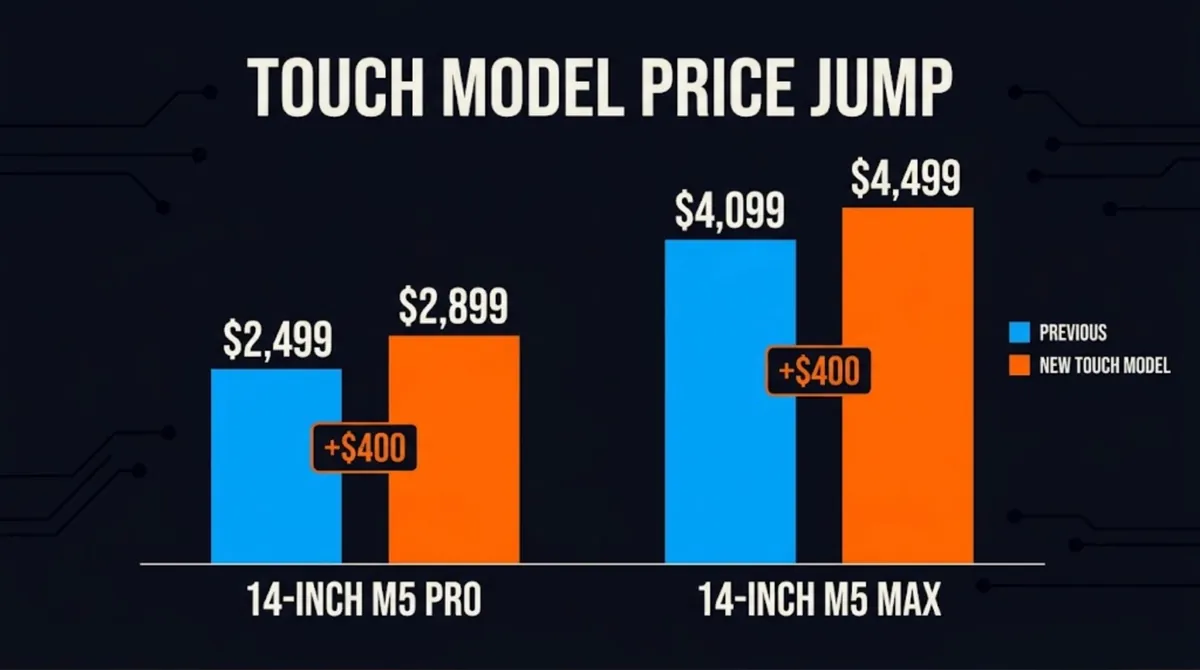
The MacBook Pro with touch screen costs $400 more than the previous model at each chip tier. That is our arithmetic from the prices below, and it works out to roughly 9 to 16 percent depending on the configuration. MacRumors lists the starting points:
- 14-inch, M5 Pro: $2,899 (15-core CPU, 16-core GPU, 24GB memory, 1TB storage), up from $2,499.
- 16-inch, M5 Pro: $3,399 (18-core CPU, 20-core GPU, 24GB, 1TB), up from $2,999.
- 14-inch, M5 Max: $4,499 (36GB, 2TB), up from $4,099.
- 16-inch, M5 Max: $4,799 (36GB, 2TB), up from $4,399.
Fully loaded with M5 Max, 128GB of memory, 16TB of storage and nano-texture glass, the 14-inch reaches $14,249 and the 16-inch $14,549. Memory tops out at 64GB with M5 Pro and 128GB with M5 Max.
Battery life, at least on paper, did not suffer. Apple claims up to 24 hours, and the per-model estimates listed by MacRumors match the existing mini-LED models' best figures. The 16-inch M5 Pro is rated for up to 24 hours of video streaming and 17 hours of web browsing; the 14-inch M5 Pro for 22 and 14 hours. The M5 Max versions are rated slightly lower: 22 and 16 hours on the 16-inch, 20 and 13 hours on the 14-inch. All of these are Apple's figures, and OLED battery claims are worth checking against real-world tests.
Who should buy a touch screen MacBook, and who should wait
Consider the touch model if you edit photos or video, work in 3D, draw, mark up documents or make music, and you already planned to spend Pro or Max money. You get touch, the brighter OLED screen, the Dynamic Island and a lighter body for $400 more than last generation's equivalent.
Pick the M6 14-inch if you want a new MacBook Pro and do not care about tapping the screen. At $1,999 it is $900 cheaper than the cheapest touch model ($2,899 minus $1,999, our arithmetic), ships the same day and carries the same up to 24 hours battery claim.
Wait if you are unsure whether you would actually use touch. The laptops ship November 6, and independent reviews should answer the real questions: how the hinge holds up, whether touch latency feels as low as Apple claims, and whether the battery numbers survive normal use. Waiting for them costs you little.
If you are curious how other hardware makers are rethinking screens, our iPhone Duo vs Galaxy Z Fold 8 teardown is a good companion read.
What to watch next
- Reviews after November 6. Independent testing of brightness, battery and touch response will confirm or correct Apple's claims.
- App updates. Watch whether the named apps (Lightroom, DaVinci Resolve, Blender, Microsoft Office and others) ship touch-specific features, or rely on macOS turning taps into clicks.
- Developer uptake. The updated gesture APIs only matter if developers use them. Apple's named apps lean toward creative and 3D tools, so start there.
- The lineup split. Apple now sells three kinds of MacBook Pro at once: M6, mini-LED and the touch OLED models. Clear labelling at checkout will matter, because the names alone will not tell buyers which one has a touch screen.
Questions readers ask
Does the MacBook Pro have a touch screen?
Yes, but only the MacBook Pro with PROLED XDR Display that Apple announced on October 28, 2026. It comes in 14-inch and 16-inch sizes with M5 Pro or M5 Max chips. The cheaper 14-inch MacBook Pro with M6, announced a day earlier, does not have a touch screen, and neither do the existing mini-LED models.
Is the touch screen MacBook Pro OLED?
Yes. Apple calls it a PROLED XDR display, a tandem OLED panel that Apple says reaches up to 2000 nits peak brightness, 1000 nits sustained full-screen brightness and a 10,000,000:1 contrast ratio. It also runs at up to 120Hz with ProMotion and offers an optional nano-texture glass finish. These are Apple's figures, not independent measurements.
How much does the touch screen MacBook Pro cost?
According to MacRumors, the 14-inch model with M5 Pro starts at $2,899 and the 16-inch with M5 Pro at $3,399. The M5 Max versions start at $4,499 and $4,799. Each is $400 more than the previous model at the same chip tier. A fully loaded 16-inch configuration reaches $14,549.
Do Mac apps work with touch without an update?
Many do, according to Apple, because macOS automatically translates touches into clicks, so a tap acts like a click. Developers can use updated gesture APIs to build controls designed for fingers. Apple names Notion, Canva, Zoom, Microsoft Office apps, Adobe Lightroom, DaVinci Resolve and Blender among the apps that will take advantage of touch.
Written by
Abdul Rehman
Lead Systems Architect and Technical Director at Syntaxradar. More in Chips & Hardware.
More in Chips & Hardware
See all
Xreal Aura: Should You Buy the $1,099 Android XR Glasses?
Xreal launched the Aura, the first glasses built on Google's Android XR, on October 28, 2026. It costs $1,099 (regular $1,279) through December and ships mid-November to the US,…
Oct 31, 2026 · 7 min read

SSD Prices: Why AI Datacenters Are Making Storage Cost More
The contract price of a 256GB TLC SSD hit about $134.20 in Q3 2026, up 303% from $33.30 a year earlier, as AI cloud buildouts absorb NAND flash. TrendForce expects NAND contract…
Oct 29, 2026 · 7 min read
MacBook Pro M6 vs M5: Who Should Upgrade, and Who Can Skip It
Apple announced the 14-inch MacBook Pro with M6 on October 27, 2026. It claims up to 25% faster on-device AI than M5 and a Neural Engine up to 1.9x faster. Pre-orders opened…
Oct 28, 2026 · 7 min read
Latest stories
Front page
AI Bubble Pop? 5 Warning Signs Behind Big Tech's $740B Bet
Abdul Rehman · Oct 31, 2026 · 7 min read
Claude Code Extension VSCode Backdoor: How to Check and Clean Up
Abdul Rehman · Oct 31, 2026 · 7 min read

AO3 Outage: Why Is AO3 Down, and Is Your Account Safe?
Abdul Rehman · Oct 30, 2026 · 7 min read

AI for Hacking: CrowdStrike Says ARTEX Targeted 200+ Orgs
Abdul Rehman · Oct 30, 2026 · 7 min read