


Gemini for Mac: What Computer Use Can Do and How to Stop It
On November 19, 2026 Google began rolling out computer use in the Gemini app for Mac, in English in the U.S., for Google AI Plus, Pro and Ultra on Apple Silicon Macs with macOS 15.0 or later. Gemini works in a background window you can pause.

Abdul Rehman
Lead Systems Architect and Technical Director · · 7 min read
The short version
- English, U.S., from November 19, 2026
- Rollout
- Google AI Plus, Pro, Ultra
- Eligible plans
- Apple Silicon, macOS 15.0+
- Mac requirement
Why it matters: Google's agent can click and type in your Mac apps from a background window, with controls to choose apps, pause and approve key actions, but Google's help page for Mac tasks warns Gemini can delete and share files.
On this page
Gemini for Mac can click, type and fill in forms on your behalf, but only for a narrow group. As of November 19, 2026, Google says computer use is rolling out in English in the U.S., for personal Google accounts held by people 18 and older on Google AI Plus, Pro or Ultra, on an Apple Silicon Mac running macOS Sequoia 15.0 or later.
Google's pitch is that the agent works in a background window while you keep using your Mac, and that you choose which apps it can touch, watch each step, pause it and approve key actions. Google's help page for tasks in the Mac app also warns that Gemini can be used to permanently delete files and share them with third parties. Those warnings shape the practical advice below: what to try first, what to keep out of the task, and where the rollout stops. For the data side, our explainer on Google Gemini privacy covers who can read your chats, which this story does not.
What does Gemini for Mac computer use do?
Gemini computer use lets the Mac app finish multi-step jobs across local files, desktop apps and the web by clicking, typing and working through menus and forms, according to Google's announcement. Gemini works in what Google calls an "isolated background window with a live preview right in your chat", so your main screen and cursor stay free for other work.
Google gave four examples: batch color-grading photos in design software or setting up 3D scenes; pulling weights, dimensions and addresses from local PDFs to fill multi-box shipping quotes; pulling metrics and screenshots from live dashboards into a Google Slides deck; and analyzing clothing photos in a folder, researching prices and staging resale listings. TechCrunch adds sorting files into folders by criteria.
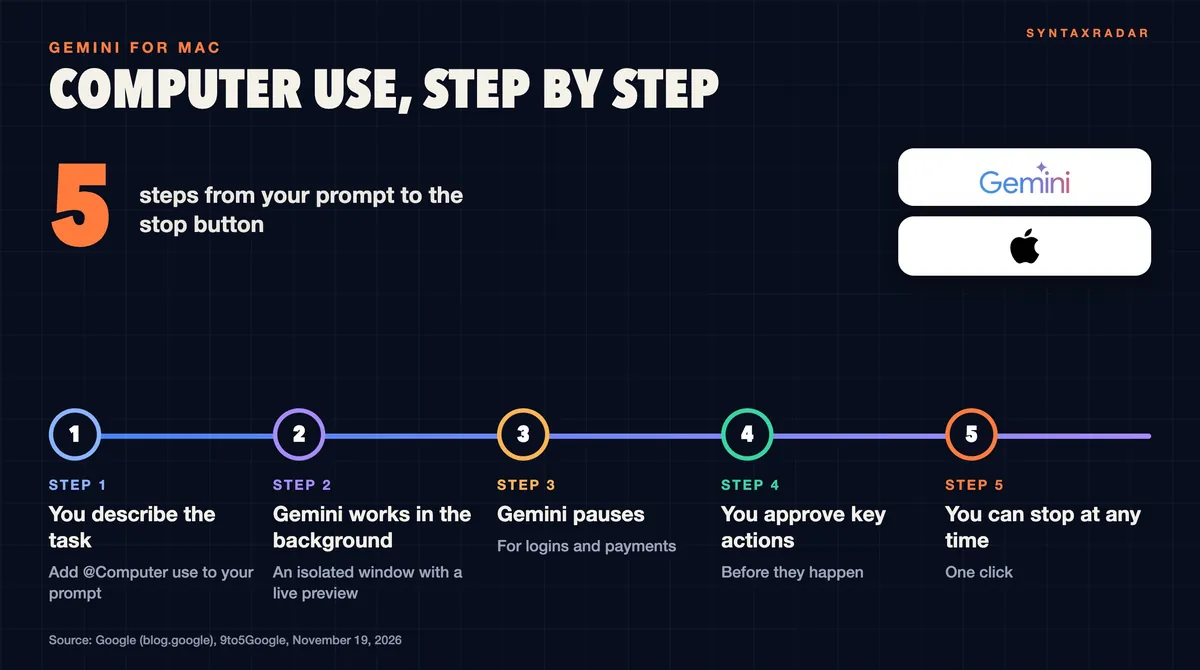
9to5Google reports the trigger (single secondary report; Google's post does not mention it): add "@Computer use" to your prompt. It also reports new "Desktop" apps such as Blender and Autodesk Fusion under Customize > Connectors, next to the existing Git and Obsidian integrations. Per the same report, the Task feature (previously called Gemini Spark) could only work with local files together with Connected Apps like Gmail and Google Calendar, and computer use adds the clicking and typing inside apps.
Three details are missing from every page we read. None says which model runs the feature, what the usage limit is for each plan, or which macOS system permissions it asks for. Google did introduce computer use as a built-in tool in Gemini 3.5 Flash for developers on June 24, 2026, but the Mac pages do not say whether the Mac app uses that model.
Is there a Gemini app for Mac? Who can use computer use?
Yes. Google launched a native Gemini for macOS app on April 15, 2026 (the date comes from TechCrunch and MacRumors coverage). Google's launch post describes it as free for Gemini users 13 and older, with Option + Space to open it from anywhere. People who want the Gemini for Mac download get it from gemini.google/mac. Computer use is the part with conditions, so check the table before expecting it.
Source for the first four rows: the footnote and availability line in Google's November 19 post. Google names Apple Silicon only, so Gemini for Mac on an Intel machine is not listed for computer use. The fifth row comes from Google's help page for the Mac app. Google has not said when computer use will reach other markets or platforms, according to TechCrunch, and iPhone in Canada reports no Canadian date.
How do you use Gemini computer use, and what should you hand over?
Start in the Gemini app, add "@Computer use" to a prompt (the trigger 9to5Google reports) and pick a job where you can check the result afterwards. Two of Google's examples fit that: turning dashboard numbers into a Google Slides deck, and filling a shipping quote from PDFs. In both cases the output is something you can open and read before it goes anywhere. That is our reading of Google's examples.
Google's help page for assigning tasks in the Mac app is the closest published guidance on what to keep out. It does not name computer use, so treat it as the Tasks warnings for the same app. It says Gemini can only view files and folders you add to Connected folders, and that with permission it can view and edit most folders, including downloads, desktop, documents and photos. If you add something by mistake, Disconnect removes it.
The same page lists what to hold back:
- Files you do not want Gemini to work with or that are too sensitive to lose, because you may not be able to recover them after a task or a delete instruction.
- Sign-in details, payment details and other sensitive information in the task thread.
- Public cloud drives added to Connected folders. Gemini can access, edit, share and delete their files and can share your data with the drive, where anyone with access to it can see it.
Gemini creates temporary backup files when it works with your files. You can recover them before your next task, and they are deleted when you start a new query or task or after 24 hours, per the help page.
Is Gemini safe? What Google's controls and warnings say
Google's announcement says "privacy and safety are built in" and names four controls: you choose which apps Gemini can access, watch every step live, pause at any time and approve key actions before they happen. It offers no further safety claim, and Google's help page for Mac tasks says Gemini "can make mistakes". 9to5Google adds three details Google's post does not state (single secondary report): you can stop Gemini with one click, it pauses for logins and payments, and sensitive actions need your confirmation. TechCrunch also reports that users can pause, stop or approve Gemini's actions.
One caution comes from iPhone in Canada: approval for key actions does not mean a prompt before every click. That is the outlet's reading of Google's wording. Google's help page says the agent is designed to ask permission before permanently deleting files or sharing them with third parties, and tells you to check file contents and recipients before approving a share.
Prompt injection (instructions hidden in a web page or document that an agent reads and may follow) is the risk the Mac announcement leaves unmentioned. Google's June 24 developer post on computer use says it used adversarial training to reduce those risks in Gemini 3.5 Flash and released two optional enterprise safeguards: explicit confirmation for sensitive or irreversible actions, and an automatic stop if an indirect prompt injection is found. The pages we read do not say whether the consumer Mac app uses those safeguards. Our own precaution, given that gap: treat web pages and files Gemini opens during a task as untrusted input.
The sources do not say what Gemini stores from a computer use session. For payments in another agent, our look at ChatGPT Wallet and Dots covers how OpenAI handles the card step.
What we checked: do the reports agree on who gets Gemini computer use?
We read six reports for the rollout scope and compared the wording with Google's post.
Five of six agree with Google. The one outlier is Unite.ai, and Google's post does not support its wider scope. We did not find the reason for the mismatch, so the table records wording only. Use Google's line.
The timeline is a second calculation, from dates in Google's own pages. Computer use arrived 218 days after the Mac app launched (April 15 to November 19, 2026), 148 days after Gemini 3.5 Flash got built-in computer use for developers (June 24) and 142 days after Gemini Spark reached the Mac app (June 30, per Google's release notes).
Spark's launch note limited it to Google AI Ultra subscribers 18 and older, so the Plus and Pro eligibility for computer use is wider than that earlier agent launch.
What to watch next
Apple is the other moving part. The Verge reports that Gemini's feature arrived ahead of Apple's new restrictions on "full disk access" for apps, aimed at the risks of AI agents. 9to5Mac reported on November 16, 2026 that the macOS 27.3 beta splits the old Device Control and Data Access toggle and adds per-app and per-folder grants, an option to ask each time, and a menu bar indicator when one app controls another. We found no final release date for macOS 27.3, and no source says whether Gemini uses full disk access.
Google Gemini computer use also lands in a field where, per TechCrunch, OpenAI, Anthropic and Meta already offer agentic features in their desktop apps. Our explainer on computer-use AI agents covers how this kind of agent works, which helps when comparing them.
Four open questions to track:
- When Google expands computer use beyond U.S. English.
- Whether Google publishes a help page that names computer use, with its permissions and limits.
- Which usage limits apply to Plus, Pro and Ultra.
- Whether Google says how the Mac app handles the macOS 27.3 permission controls once that update ships.
Until those answers arrive, Gemini for Mac computer use is a U.S. English feature for paid subscribers, and Google's own controls and warnings are the best guide to using it.
Questions readers ask
Is there a Gemini app for Mac?
Yes. Google launched a native Gemini app for Mac on April 15, 2026, according to TechCrunch and MacRumors, and Google's launch post says it is free for users 13 and older, opens with Option + Space and downloads at gemini.google/mac. Computer use is a later feature inside the app and has extra requirements.
Is there a Gemini for Mac Intel version?
Google's computer use footnote requires an Apple Silicon Mac running macOS Sequoia 15.0 or later, and Google's Gemini for macOS help page lists Apple Silicon as a requirement. Neither page lists Intel Macs, so Google's published requirements point to Apple Silicon only.
How do you turn on Gemini computer use on a Mac?
9to5Google reports, in a single secondary report, that you add "@Computer use" to your prompt in the Gemini app and can stop Gemini with one click. Google says you choose which apps Gemini can access, can pause at any time and approve key actions. We found no source describing a separate global off switch.
Will Gemini enter passwords or payments for me?
9to5Google reports, in a single secondary report, that Google pauses for logins and payments and asks for confirmation on sensitive actions; Google's own post does not say this. Google's help page for tasks on Mac says not to enter sign-in details or payment details in the task thread.
Is Gemini computer use available outside the U.S.?
As of November 19, 2026, Google's announcement says computer use is rolling out in English in the U.S. TechCrunch reports Google has not said when it will expand to other markets, and iPhone in Canada reports no Canadian date. One outlet, Unite.ai, reports a wider rollout that Google's post does not state.
Sources
Written by
Abdul Rehman
Lead Systems Architect and Technical Director at Syntaxradar. More in AI & Models.
Keep reading
Google Gemini Privacy: Who Reads Your Chats and for How Long
Google's Gemini help pages say a subset of chats is read by human reviewers and kept up to three years even after you delete activity, and that chats train its AI while Keep…
Nov 11, 2026 · 7 min read

What Is Gemini 4 Carbon? Google's Bug-Hunting AI, Explained
On October 28, 2026, Google DeepMind announced Gemini 4 Carbon, a frontier model built to find, exploit and patch software vulnerabilities. It goes first to a small group of cyber…
Oct 29, 2026 · 7 min read

Gemini 4 Carbon: Why Google's New AI Goes to Defenders First
Google announced Carbon on Oct 28, 2026, a security-focused Gemini 4 model that scores 88.2% on SEC-bench Pro and 0.0% prompt-injection success. It goes to a subset of cyber…
Oct 29, 2026 · 6 min read
More in AI & Models
See all
OpenAI Usage Policies: Gateway Approval and Training Ban
OpenAI's usage policies took effect November 20, 2026. Services that give third parties direct model access need prior approval, and OpenAI outputs cannot train substitute models.…
Nov 22, 2026 · 7 min read
Meta AI Muse Spark: What Privacy Reports Say, Meta's Reply
As of November 20, 2026, Reuters (via TechCrunch) reports Meta employees flagged Muse mixing up accounts. Meta calls them isolated incidents and says users can turn off AI…
Nov 21, 2026 · 7 min read

Anthropic Stock Price: $83 IPO, $111.50 Open, $97.17 Close
Anthropic (ANT) priced its IPO at $83 on November 18, 2026, first traded at $111.50 on November 19 and closed at $97.17. On November 20 it traded near $87 intraday, as low as…
Nov 21, 2026 · 6 min read
Latest stories
Front page
NoisyTCP: The Linux Kernel TCP Flaw and Who Must Patch
Abdul Rehman · Nov 23, 2026 · 7 min read

US Approves AI Chips to China: 879,868 H200 and MI325X Cleared
Abdul Rehman · Nov 22, 2026 · 6 min read
Nothing AI Device: What Is Confirmed Before the Dec 8 Reveal
Abdul Rehman · Nov 22, 2026 · 7 min read
KB5132061: Windows 11 Install Errors Explained, and the Fix
Abdul Rehman · Nov 22, 2026 · 7 min read