


KB5132061: Windows 11 Install Errors Explained, and the Fix
KB5132061, released November 10, 2026, failed on some Windows 11 PCs that had the October preview KB5127936, with errors 0x80070306, 0x800f0989 or 0x800f0993. Microsoft began an automatic repair on November 11 and marked the issue resolved on November 16.

Abdul Rehman
Lead Systems Architect and Technical Director · · 7 min read
The short version
- 0x80070306, 0x800f0989, 0x800f0993
- Failing error codes
- 24 to 48 hours from Nov 11, 10am PT
- Microsoft repair window
- November 16, 2026
- Marked resolved
Why it matters: As of November 21, 2026, Microsoft says the repair needs no user action and the issue was resolved on November 16; it told admins only PCs with the October preview KB5127936 were affected.
On this page
KB5132061, the Windows 11 security update released November 10, 2026, failed to install on a limited number of PCs with error 0x80070306, 0x800f0989 or 0x800f0993. Microsoft told IT admins, as reported by BleepingComputer, that only devices that had installed the October preview update KB5127936 are affected. Microsoft started an automatic repair on November 11, 2026 at 10am PT, said it should reach affected devices within 24 to 48 hours, told end users to do nothing, and marked the issue resolved on November 16, 2026.
As of November 21, 2026, a PC that still fails has three sourced paths: wait for Windows Update, follow Microsoft's manual installation instructions, or contact Microsoft Support. The sections below separate what Microsoft confirmed from user tips, and a table turns Microsoft's dates into days.
Why is KB5132061 failing to install?
The update fails on PCs that installed the optional October 28, 2026 preview update KB5127936, according to BleepingComputer's report of Microsoft's service update dated November 12, 2026. Microsoft says the problem affects "a limited number of devices that installed the October 2026 non-security preview update", and that devices without that preview are not affected. Microsoft's update page lists the same symptoms: the device may retry the installation repeatedly or show one of three error codes.
Microsoft has not published a root cause on the pages we read, and we found no outlet that confirms one. Treat any single-cause story as a guess.
Two KB numbers cause most of the confusion. KB5127936 is the October 28 optional preview, according to Microsoft's KB5127936 page, and KB5132061 is the November 10 security update.
The known-issue text on Microsoft's KB5132061 page itself calls the failing November security update KB5127936, and BetaNews repeated that label. Microsoft's KB5127936 page and the service update quoted by BleepingComputer both treat KB5127936 as the October preview, so we read the KB5132061 page's label as a typo and use KB5132061 for the November update. Our post on how to update Windows 11 with KB5127936 covers what that October preview was.
Which devices hit Windows 11 update error 0x800f0993 and 0x80070306?
Windows 11 update error 0x800f0993 is one of three codes on Microsoft's list, next to 0x80070306 and 0x800f0989. The update applies to Windows 11 versions 26H2 and 25H2 in all editions and to 24H2 Enterprise and Education, with builds 26300.9974 (26H2), 26200.9974 (25H2) and 26100.9974 (24H2), per Microsoft. The failure itself is limited to devices that took the October preview first.
User reports showed what it looked like on the screen. Windows Latest, writing on November 11, 2026, collected one user with 0x800f0989 or 0x80070306 on four PCs, another with 0x80070306 on two virtual machines, and a third with seven failed attempts, including the offline installer from the Microsoft Update Catalog, before it installed. It also saw 0x800f0922 in one report only. Others had no errors, or installed after a restart and a retry. These are individual reports, and no source gives a count of affected devices.
Microsoft's pages list the 0x80070306 Windows Update code as a symptom and do not define it. On November 11, 2026, Windows Latest and The Register both reported that Microsoft's page then listed no known issue for the update. Microsoft added the known issue on November 11, 2026, according to the change log on its KB page.
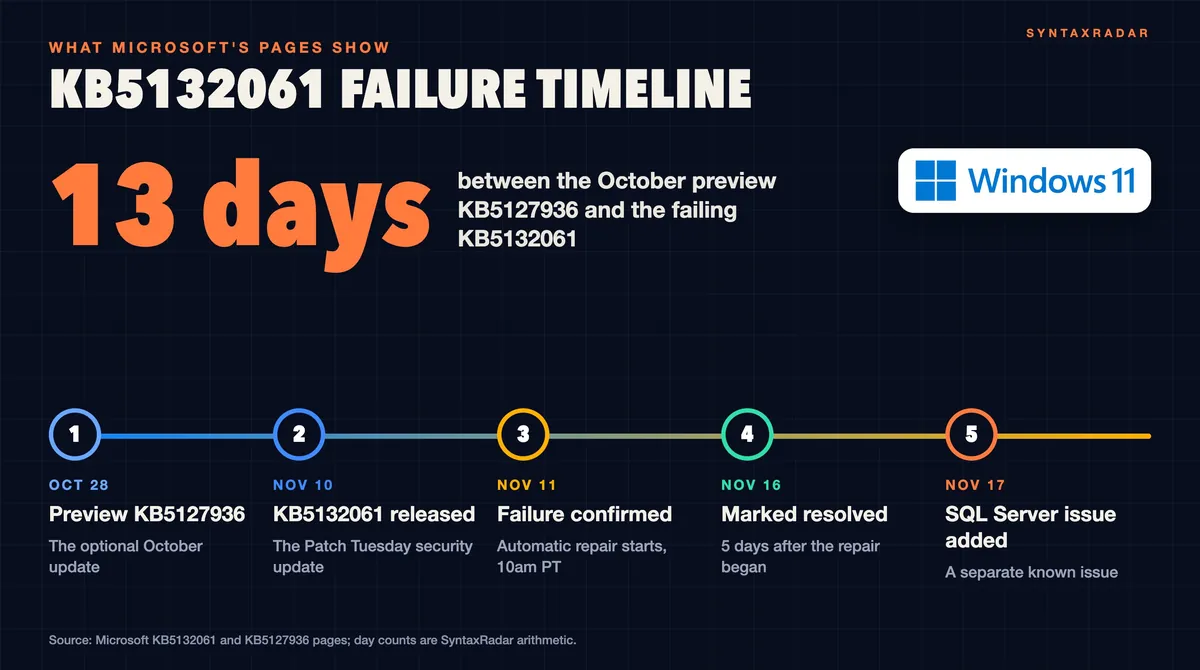
KB5132061 known issues: what Microsoft's repair did and when
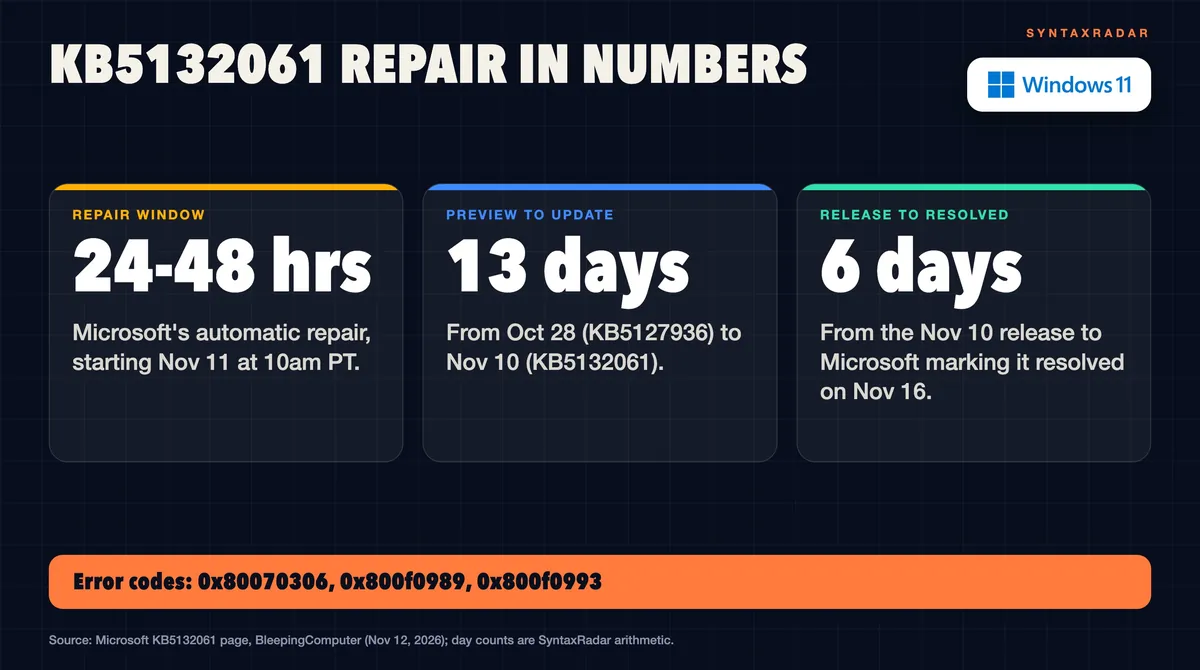
KB5132061 known issues on Microsoft's page number two as of November 21, 2026, and the installation failure is the one with a fix. Microsoft says the repair ran automatically on affected devices that were connected to the internet and used Windows Update in Settings, with no manual action by users. After the repair, the device downloads and installs the November security update through Windows Update by itself. Microsoft's guidance for a PC that still fails is to use its manual installation instructions or contact Microsoft Support, and BleepingComputer reports that Microsoft told IT admins still seeing problems after 48 hours to contact Support.
The change log shows the sequence: the installation-failure issue was added November 11, 2026, and marked resolved on November 16, 2026, while the page still lists it under known issues. The second known issue, added November 17, concerns SQL Server and is covered further down. Microsoft's Windows release health page for 25H2, as we read it on November 21, 2026, lists the SQL Server issue as confirmed and does not show the installation failure as an open item.
One caution on the word "resolved": we read it as Microsoft closing its repair rollout. The page does not say every PC has installed the update, and it gives no count of affected or repaired devices.
SyntaxRadar calculation: the KB5132061 failure in days
The SyntaxRadar calculation below counts calendar days from the November 10, 2026 release to each date on Microsoft's pages. Every date is from Microsoft's KB pages, and the day counts are our arithmetic.
Read together, affected PCs held the October preview for 13 days before the failing update arrived, Microsoft's repair started 1 day after release, and the issue was marked resolved 5 days after the repair started (6 days after release). The table measures Microsoft's listing dates, not when any single PC was repaired, and Microsoft gives no count of devices.
How to fix Windows Update error 0x800f0989 if KB5132061 still fails
Start with the steps Microsoft states, because they are the only confirmed ones. Microsoft says the repair works on internet-connected devices that use Windows Update in Settings, after which the update downloads and installs by itself. If it still fails, Microsoft points to its manual installation instructions or to Microsoft Support. The KB page also lists a prerequisite: servicing stack update KB5132688 (build 26100.9971) or later.
The steps below come from outlets reporting user experience. Microsoft has not confirmed any of them for this issue.
- Turn off Windows Sandbox, restart and retry. One user's logs pointed to Windows Sandbox, and the update installed after it was off; another user hit the error without Sandbox. Pureinfotech gives the steps (Settings, System, Advanced, Virtual Workspaces) and says the tip is not a confirmed fix for all failures.
- Run the standard repairs. Help Desk Geek suggests a restart, the Windows Update troubleshooter,
sfc /scannow,DISM /Online /Cleanup-Image /RestoreHealthand freeing several GB on the system drive. - Try a repair install. Windows Latest points to "Fix problems using Windows Update" under Settings, System, Recovery, which reinstalls the current Windows version while keeping apps, files and settings. Our guide on how to reinstall Windows 11 shows which options keep your files.
- Treat the Update Catalog as a last resort. Help Desk Geek calls it unverified for this update, since it needs prerequisite updates in the right order, and recommends a backup first.
Help Desk Geek also mentions pausing updates and notes that it delays security patches. Windows Latest adds that the update may need two or more restarts because of a pending Secure Boot certificate update, so a single restart is not always a failure.
Is the SQL Server linked server issue the same problem?
No. The SQL Server issue is a separate known issue, added to Microsoft's page on November 17, 2026. According to Microsoft, on server devices with Windows updates released October 13, 2026 or later, connections created by SQL Server linked server queries that use OLE DB providers can stay open after the queries finish. Oracle and PostgreSQL connections are among those affected. The open connections build up and can slow a server over time.
Microsoft's workaround is a mitigation for enterprise devices through Microsoft Support for business. Closing idle connections or restarting the SQL service gives temporary relief, but it can interrupt active queries and the problem may return.
The two Microsoft pages we read word the fix differently: the Windows release health page says an out-of-band update would come in the next few days, while the KB page says Microsoft is working on a resolution and gives no date. We found no source confirming that update had shipped as of November 21, 2026. A home PC that fails to install KB5132061 is a different case. For a different kind of Microsoft failure, our Microsoft 365 outage explainer covers why Outlook went down across the Americas.
What to watch next for KB5132061
Three questions are open as of November 21, 2026. Microsoft has not published a root cause for the failed installs, it has not said how many devices were affected, and the SQL Server fix has no confirmed release. The November 19 preview update KB5132057 lists no installation-failure issue, and Microsoft's KB page says there is no December 2026 preview update, with monthly servicing resuming in January 2027.
If your PC is still stuck, Microsoft's KB page is the place to check for changes to the known-issues list. For another patch-and-fix story from the server side, see our OpenSSH vulnerability 2026 explainer.
Questions readers ask
Do I need to do anything about the KB5132061 install failure?
Microsoft says end users do not need to take any action. The repair ran automatically on affected devices that were connected to the internet and used Windows Update in Settings, starting November 11, 2026 at 10am PT. If the update still fails, Microsoft points to its manual installation instructions or Microsoft Support.
Is KB5127936 the same update as KB5132061?
No. According to Microsoft's KB pages, KB5127936 is the optional non-security preview released October 28, 2026, and KB5132061 is the security update released November 10, 2026. Microsoft ties the install failures to devices that installed the October preview. The known-issue text on the KB5132061 page and BetaNews label the November update KB5127936, which reads as a typo.
What does error 0x80070306 mean for KB5132061?
Microsoft lists 0x80070306, 0x800f0989 and 0x800f0993 as symptoms of the installation issue, where a device repeatedly tries to install the update or shows one of the codes. We found no Microsoft page or outlet that explains what 0x80070306 means on its own, or gives a root cause.
Is the Windows Sandbox fix for KB5132061 confirmed by Microsoft?
No. Windows Latest and Pureinfotech reported that the update installed for some users after Windows Sandbox was turned off and the PC restarted, but another user had the error without Sandbox enabled. Pureinfotech says it is not a confirmed fix for all failures, and Microsoft has not endorsed it.
Does the SQL Server issue affect my home PC?
Microsoft describes the SQL Server linked server issue as affecting server devices with Windows updates released October 13, 2026 or later, where linked server queries using OLE DB providers leave connections open. It is a separate known issue from the installation failure, added to the KB5132061 page on November 17, 2026.
Sources
Written by
Abdul Rehman
Lead Systems Architect and Technical Director at Syntaxradar. More in Systems.
Keep reading
How to Update Windows 11: Grab KB5127936 Now or Wait for Nov 10
Microsoft released KB5127936, an optional preview update for Windows 11 versions 25H2 and 26H2 with 41 changes, on October 29, 2026, per BleepingComputer. Pureinfotech says the…
Nov 6, 2026 · 6 min read
Outlook DMARC Requirements: Why Your Email Is Suddenly Bouncing
Since November 5, 2026, Outlook.com, Hotmail, Live and MSN have been rejecting some mail from domains with no DMARC record, per MailRoute. Microsoft has not confirmed it; its…
Nov 9, 2026 · 6 min read

OpenSSH Vulnerability 2026: The Alpine Login Bug and the Fix
OpenSSH 10.6p2 shipped on November 5, 2026 to work around a password bypass on musl Linux systems without PAM. Alpine says an attacker who can reach the SSH port can log in…
Nov 6, 2026 · 8 min read
More in Systems
See all
NoisyTCP: The Linux Kernel TCP Flaw and Who Must Patch
NoisyTCP (CVE-2026-99288) is a Linux kernel TCP flaw that lets an unauthenticated attacker crash a server through an open port. The fix merged November 3, 2026 and the advisory…
Nov 23, 2026 · 7 min read

Chase Data Breach: Vendors Hit, Names and Emails at Risk
On November 19, 2026 JPMorgan Chase said third-party vendors were hit by a cyberattack and that marketing data, which may include some customer names and email addresses, was…
Nov 20, 2026 · 7 min read
Google Project Zero Disclosure Policy: 90 Days Now, 30 by 2028
On November 13, 2026 Google Project Zero replaced its 90+30 rule with Full X: bug details go public X days after the vendor gets the report, fixed or not. X is 90, falls to 60 on…
Nov 16, 2026 · 6 min read
Latest stories
Front page
US Approves AI Chips to China: 879,868 H200 and MI325X Cleared
Abdul Rehman · Nov 22, 2026 · 6 min read
Nothing AI Device: What Is Confirmed Before the Dec 8 Reveal
Abdul Rehman · Nov 22, 2026 · 7 min read

OpenAI Usage Policies: Gateway Approval and Training Ban
Abdul Rehman · Nov 22, 2026 · 7 min read

When Will SSD Prices Drop? TrendForce Says 2027, Retail Lags
Abdul Rehman · Nov 21, 2026 · 8 min read