


Microsoft 365 Outage: Why Outlook Went Down Across the Americas
On November 12, 2026, Exchange Online servers in the Americas became unavailable and overloaded the rest, cutting off Outlook mail, calendars and sign-ins (EX1550543). As of 06:57 UK on November 13, Microsoft had not declared a fix.

Abdul Rehman
Lead Systems Architect and Technical Director · · 7 min read
The short version
- Just over 130,000 reports
- Outlook Downdetector peak
- Just above 45,000 reports
- Microsoft 365 Downdetector peak
- EX1550543
- Exchange incident ID
Why it matters: Some Exchange Online servers dropped out and the rest buckled under the load, so wait for Microsoft's fix, use a backup channel, and do not reset passwords or reinstall Office.
On this page
The Microsoft 365 outage that began on November 12, 2026 cut off users across the Americas from their Exchange Online mailboxes, and as of Microsoft's 09:10 UK update on November 13 it had not been declared fixed. Microsoft tracks it as incident EX1550543. At the peak, just over 130,000 people had reported Outlook down on Downdetector, NBC Chicago reported.
Status in one line: the root cause is not confirmed, Microsoft says it has seen no sign of malicious activity, and as of its 06:57 UK update engineers were reverting a recent network configuration change. Admin guidance for affected organisations is clear on one point. Do not reset passwords or reinstall Office.
Is Outlook down? What Microsoft had said by November 13
Yes, for many people it was, and recovery was still incomplete. At 09:10 UK time on November 13, 2026, Microsoft reported early signs of stabilization but said service capacity had not returned to normal levels, according to Azure Blog UK's incident log. At 06:57 it had reported only "marginal success" from patches and reboots, and it had not called the incident resolved.
Microsoft first confirmed the problem just before noon ET on November 12, saying users could not reach Exchange Online mailboxes "through multiple connection methods in the Americas."
The list of things that broke is long. WGCU reported problems with Exchange Online mailboxes, Outlook.com, web apps, sending and receiving mail, calendars and Microsoft 365 sign-ins. Thousands of people also reported trouble with Teams and Copilot.
The Microsoft 365 outage map on Downdetector lit up hardest around Chicago, Seattle and New York, per NBC Chicago. Microsoft's own status page was no help at first: GV Wire reported that the status checker was unavailable and had shown every product as operational before reports escalated.
If you run IT for a team, follow the incident IDs EX1550543 and MO1550821 in the Service health page of the Microsoft 365 admin center. Microsoft's service health documentation says to use the service status page if you cannot sign in to the admin center, and points to @MSFT365status on X for some events.
Why is Outlook down?
Outlook is down because the Exchange Online servers behind it stopped coping, which makes this a failure on Microsoft's side. Microsoft said the strain came from "a number of servers being unexpectedly unavailable," not from extra traffic, and that overloaded the infrastructure that was left, as reported by NBC Chicago.
Picture a supermarket where several checkout lanes close at once. The same shoppers now crowd the remaining lanes, and those lanes slow to a crawl too. That is the pattern Microsoft described.
Health checks sit at the centre of this. A health check is an automated test that decides whether a server is fit to receive traffic. At 19:43 UK time, the affected servers were failing those checks and were taken out of service. Around 3 p.m. ET, Microsoft validated an alternative health-check method that returned some servers to service.
It did not hold. Servers became unresponsive again once they received traffic, WGCU reported, so Microsoft limited which types of traffic could reach the affected infrastructure in some locations and rebuilt a subset of servers using a previous configuration. By the morning of November 13, Microsoft said a process that sets up secure connections on each server becomes overwhelmed. In plain English: the step where your app and the server agree on an encrypted link, before any mail moves, is where things jam.
One check before you blame the outage. If your messages come back with a rejection notice while Outlook itself loads fine, that is a different problem, and our explainer on Outlook DMARC requirements covers why mail bounces even when every server is up.
What is Exchange Online?
Exchange Online is Microsoft's cloud-hosted email and calendar service: the servers that store Microsoft 365 mailboxes and hand mail and meetings to Outlook on your desktop, phone and browser. Microsoft's plan options page lists it as a service inside both Microsoft 365 and Office 365 plans. When Exchange Online fails, Outlook has nothing to show, which is why one fault looks like "Outlook down" to most people.
Does this outage affect Teams? Partly, and the record is messier than the headlines. A separate Teams incident, TM1550488, ran from 14:45 to 15:53 UK time on November 12 with a preliminary cause of "resource contention" (too many jobs fighting over the same computing capacity), and Microsoft resolved it, per Azure Blog UK. That Teams problem ended before the Exchange trouble started at 16:17 UK time.
At 18:26 UK time, Microsoft opened a second incident for dependent services, meaning products that rely on Exchange. The sources do not list which products those are. One possible reading of the Teams and Copilot reports that came later: both reach into mailboxes and calendars, so they stumble when Exchange does. Microsoft has not said this.
SyntaxRadar calculation: how fast Downdetector reports fell
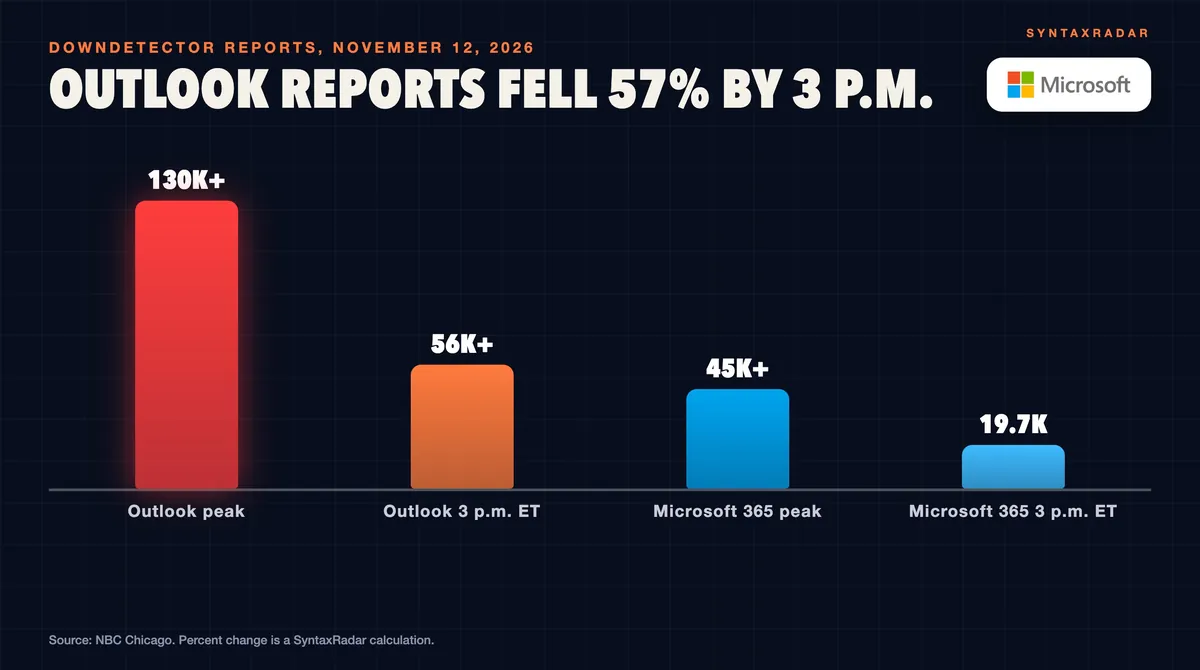
Downdetector figures fell by more than half within three hours, even though Microsoft had not fixed the problem. We worked out the drop from the numbers NBC Chicago published.
Inputs: (130,000 minus 56,000) divided by 130,000 is 0.57. (45,000 minus 19,700) divided by 45,000 is 0.56. The Outlook count also ran close to three times the Microsoft 365 count at both points (130,000 to 45,000 at the peak, 56,000 to 19,700 at 3 p.m.).
Two timing numbers come from Azure Blog UK's log. The Exchange problem began at 16:17 UK time, and the dependent-services incident opened at 18:26, a gap of 2 hours 9 minutes. UK time in November is five hours ahead of ET, so 16:17 UK is 11:17 a.m. ET. That puts the Outlook peak about an hour after the start, and Microsoft's public confirmation roughly 40 minutes in.
What we checked: A Downdetector line is a tally of reports, so a falling line does not prove a recovery. Two readings fit the facts: people may stop reporting once a problem is widely known, and Microsoft did return some servers to service around 3 p.m. ET. The sources do not say which drove the drop. We also left out a 600,000 figure from GV Wire, because it conflicts with NBC Chicago's 130,000 peak and its timeline.
One more limit: we could not read Microsoft's own incident posts (the status page returned no incident text when we fetched it, and X would not load), so Microsoft's wording in this post reaches you through NBC Chicago, WGCU and Azure Blog UK.
What caused the Microsoft 365 outage?
The cause is not confirmed. Microsoft's leading thread, as of 06:57 UK on November 13, is a recent network configuration change that correlates with the start of impact, and it is reverting that change. A correlation can be a coincidence, and Microsoft has not called it the root cause.
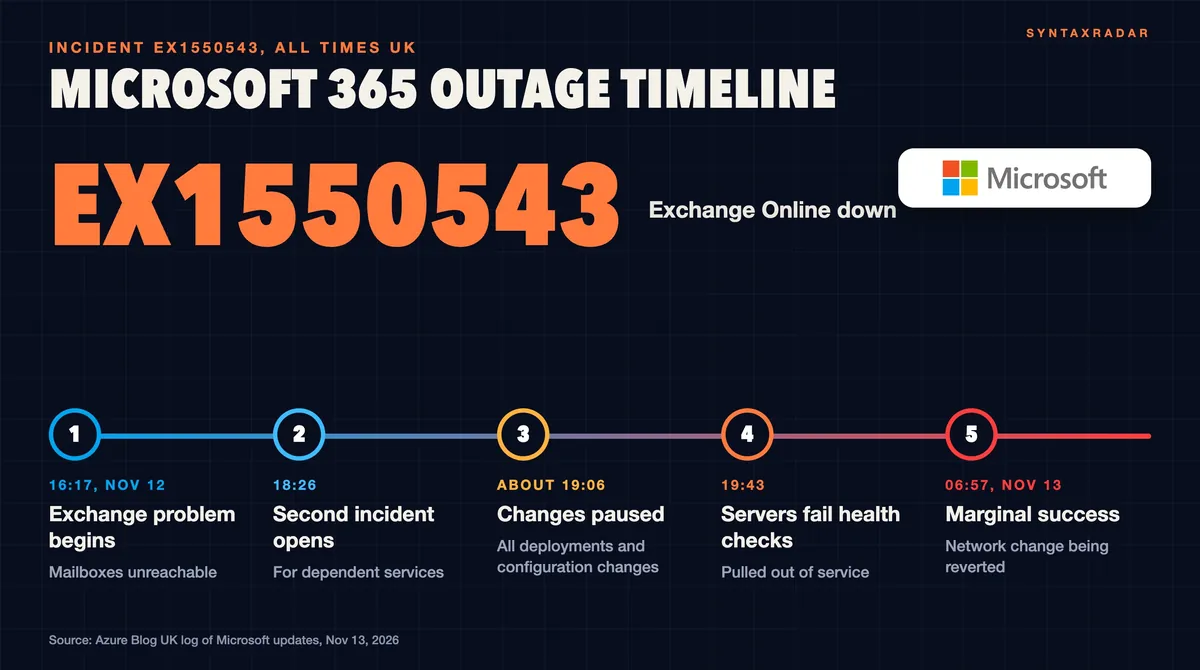
Here is the sequence from Azure Blog UK's log of Microsoft's updates (UK times; Azure Blog UK is our only source for these timestamps):
- 16:17, Nov 12: Exchange Online problem begins.
- 18:26: Second incident opens for dependent services.
- About 19:06: Microsoft pauses all deployments and configuration changes.
- 19:43: Affected servers are failing automated health checks and are taken out of service.
- 04:11, Nov 13: Microsoft says there is no indication of malicious activity.
- 06:57: "Marginal success" from patches and reboots; the network change is being reverted.
The "no malicious activity" line matters if you are worried about your data, because it means Microsoft sees no sign of an attack behind the outage. For what a real exposure involved, our explainer Is Notion secure? walks through one.
Exchange Online failed earlier in 2026 too. An August 31 outage, EX1464935, was blamed on core authentication configuration issues and drew tens of thousands of Downdetector reports, and a January 22 outage in North America hit Outlook, Teams, Defender, SharePoint and Purview, according to Tom's Guide.
What to do while Outlook is down
For anyone affected, the advice from the admin guidance is short:
- Check before you fix. Look at status.cloud.microsoft and your organisation's Service health page for EX1550543 before touching your own device.
- Do not reset your password or reinstall Office. The fault is on Microsoft's servers.
- Use a channel outside Microsoft 365 for anything urgent: phone, text or a personal email address.
For IT admins and small teams, a few extra steps, mostly from Azure Blog UK's admin guidance:
- Send staff updates outside Microsoft 365. If Outlook and Teams are both shaky, an email to a work mailbox may not get through.
- Add out-of-band alert addresses. Admins can add up to two email addresses for service notices, per Microsoft's service health documentation, and Azure Blog UK's guidance adds that at least one should sit outside Microsoft 365.
- Save the post-incident report. Once Microsoft publishes it, you can pull it through Microsoft Graph with
GET /admin/serviceAnnouncement/issues/EX1550543/incidentReport. Service health shows issue history for the past 30 days, according to the same documentation, so download it before it ages out.
If you are asking whether your account is safe during an outage like this, our AO3 outage explainer answers that same question for a different service and shows how to tell a site-wide failure from a problem with your own login.
What to watch next
Until Microsoft closes this Microsoft 365 outage, the next marker is whether Microsoft declares EX1550543 resolved and whether reverting the network configuration change ends the server overloads. As of 09:10 UK on November 13, 2026, Microsoft had not declared the incident fixed.
After that, watch for the post-incident report. It should say whether the network change was the root cause or only a coincidence in timing, why the health checks failed, and why the secure-connection process on each server could not keep up. Microsoft 365 admins should fetch it inside the 30-day window, and the report should be the final word on cause, whatever the Downdetector counts did.
Questions readers ask
Is Microsoft 365 down?
As of 09:10 UK time on November 13, 2026, Microsoft had not declared incident EX1550543 fixed. It reported early signs of stabilization but said capacity had not returned to normal. Check status.cloud.microsoft or the Service health page in the admin center for the latest update before troubleshooting your own device.
Is there an Office 365 outage too?
Office 365 plans that include Exchange Online sit inside the same incident. Microsoft's plan documentation lists Exchange Online as a service in both Microsoft 365 and Office 365 plans, and the mailbox fault is EX1550543. Microsoft opened MO1550821 for services that depend on Exchange Online, and it had not declared the mailbox incident fixed as of 09:10 UK on November 13.
Was the Outlook outage a cyberattack?
Microsoft said at 04:11 UK time on November 13 that there was no indication of malicious activity. Its leading thread is a recent network configuration change that lines up with the start of the problem, though Microsoft has not confirmed that as the root cause. The post-incident report should settle it.
What should I do about Outlook problems today?
Check Service health for EX1550543 before touching your own device, and do not reset your password or reinstall Office, because the fault sits on Microsoft's Exchange Online servers. Use a phone, text or a personal email address for anything urgent, and follow the incident ID until Microsoft posts a fix.
Did the outage affect Teams too?
Thousands of people reported Teams and Copilot problems. A separate Teams incident, TM1550488, ran from 14:45 to 15:53 UK time on November 12 with a preliminary cause of resource contention and was resolved. Microsoft later opened an incident for services that depend on Exchange but did not list them.
Sources
Written by
Abdul Rehman
Lead Systems Architect and Technical Director at Syntaxradar. More in Systems.
Keep reading

FAA Outage: What Broke in Air Traffic Control on November 13
On November 13, 2026 the FAA halted departing flights nationwide from 3:54pm to 8:15pm ET after communication issues hit multiple air route control centers. More than 7,000…
Nov 14, 2026 · 6 min read

AO3 Outage: Why Is AO3 Down, and Is Your Account Safe?
AO3 went offline on Oct 29, 2026 under a maintenance notice, and OTW estimated 2 to 4 weeks to restore it. On Oct 30 OTW said it had detected evidence of a security incident, that…
Oct 30, 2026 · 7 min read

Outlook DMARC Requirements: Why Your Email Is Suddenly Bouncing
Since November 5, 2026, Outlook.com, Hotmail, Live and MSN have been rejecting some mail from domains with no DMARC record, per MailRoute. Microsoft has not confirmed it; its…
Nov 9, 2026 · 6 min read
More in Systems
See all
NoisyTCP: The Linux Kernel TCP Flaw and Who Must Patch
NoisyTCP (CVE-2026-99288) is a Linux kernel TCP flaw that lets an unauthenticated attacker crash a server through an open port. The fix merged November 3, 2026 and the advisory…
Nov 23, 2026 · 7 min read
KB5132061: Windows 11 Install Errors Explained, and the Fix
KB5132061, released November 10, 2026, failed on some Windows 11 PCs that had the October preview KB5127936, with errors 0x80070306, 0x800f0989 or 0x800f0993. Microsoft began an…
Nov 22, 2026 · 7 min read

Chase Data Breach: Vendors Hit, Names and Emails at Risk
On November 19, 2026 JPMorgan Chase said third-party vendors were hit by a cyberattack and that marketing data, which may include some customer names and email addresses, was…
Nov 20, 2026 · 7 min read
Latest stories
Front page
US Approves AI Chips to China: 879,868 H200 and MI325X Cleared
Abdul Rehman · Nov 22, 2026 · 6 min read

Nothing AI Device: What Is Confirmed Before the Dec 8 Reveal
Abdul Rehman · Nov 22, 2026 · 7 min read

OpenAI Usage Policies: Gateway Approval and Training Ban
Abdul Rehman · Nov 22, 2026 · 7 min read

When Will SSD Prices Drop? TrendForce Says 2027, Retail Lags
Abdul Rehman · Nov 21, 2026 · 8 min read